The Google Ads Lifecycle page
Read ad spend through to booked jobs and paid invoices, and how each figure was attributed.
The Google Ads Lifecycle page
Data → Google Ads Lifecycle
This page answers the question Google cannot: what did the money buy? It joins daily ad spend to the leads it produced, then to the jobs and paid invoices those leads became, and shows how each link was made.
Requires the analytics:read permission.
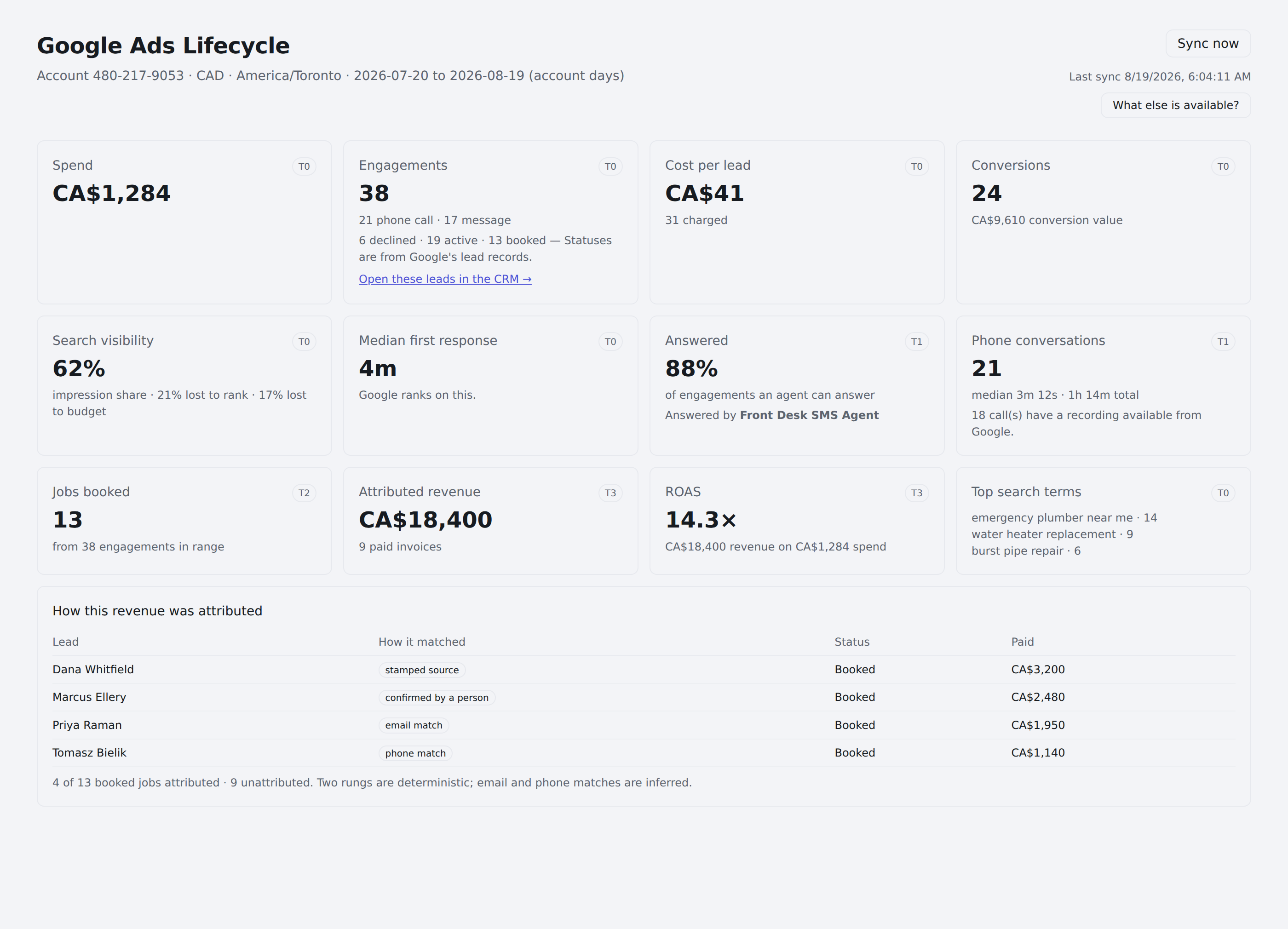
The page shows only what it can prove
Cards are tiered by the data behind them. A card whose data does not exist says so instead of showing a zero — a zero is a claim about your business, and "we cannot see this" is a claim about our data.
| Tier | Needs | Cards it unlocks |
|---|---|---|
| T0 | Google Ads alone | Spend, engagements, cost per lead, response time, search visibility |
| T1 | Conversations we hold | Answered rate, phone conversations, talk time |
| T2 | A service CRM with jobs | Jobs booked |
| T3 | Invoices marked paid | Attributed revenue, ROAS |
A tenant with no service CRM connected sits at T1 and sees a complete, honest page — it simply does not pretend to know about revenue.
Cards also depend on which campaigns you run
Tier is about how deep your data goes; campaign type decides which cards are meaningful at all.
| Card | Appears for |
|---|---|
| Spend, engagements, cost per lead | Every campaign type (leads only where they exist) |
| Conversions | Search, Performance Max, Display — Local Services campaigns rarely configure Google conversion tracking, so the card says the tracking does not apply rather than printing 0 |
| Search visibility | Search and Display. On a Local Services-only account it says so plainly |
| Top search terms | Search campaigns only |
| Response time, answered rate, phone conversations | Local Services |
| Jobs booked, attributed revenue, ROAS | Local Services, with a service CRM connected |
On a mixed account — say Local Services alongside Performance Max — spend covers everything while the lead-level cards describe the Local Services half. Each card names its own scope rather than leaving you to work out which campaigns a number came from.
The header
The line under the title states what you are looking at: the account ID, the currency, the time zone, and the date range in account days. Every figure is bucketed by the ad account's local day, not UTC and not your own time zone — that is the day spend is denominated in, and joining three sources on three different midnights is how a Monday's return quietly includes Sunday's spend.
Last sync and Sync now sit at the top right, with a Channel settings & diagnostics link (tenant administrators) — live channel state, Troubleshoot and Check reply capability live there, while this page reads figures calculated by the last sync, so it is as current as that timestamp.
Reading the cards
Spend
Total ad spend in the range, in the account's currency.
Spend can be genuinely unavailable. Some Local Services campaigns do not expose cost through Google's API. When that happens the card says so rather than showing 0 — an unknown cost and a zero cost are different facts, and only one of them is good news.
Engagements
Every lead Google reports, broken down by kind — 13 phone call · 2 message — and by status: declined · active · booked. Statuses come from Google's own lead records.
Open these leads in the CRM → filters your contacts to exactly this set.
Clicks resolved
Shown once at least one Google Ads click has been captured on your site. When a visitor opens the chat widget, submits a form that posts to a Karmaflow.ai form endpoint, or identifies themselves to the tracker, Karmaflow.ai keeps the click id (gclid) Google put in the URL. Each night it asks Google which campaign, ad group, keyword and ad that click came from, and writes the answer onto the contact. The card reads resolved / captured, with how many are still being matched, how many Google had no record of within its 90-day window, and when it last asked. Resolve now (needs the analytics:manage permission) runs the pass immediately instead of waiting for the night; it costs a few Google operations per linked account.
Google keeps click details for 90 days and answers one day at a time, so a click captured long after it happened can take a few nights to match. Local Services leads carry no click id and never appear here.
On the contact itself the answer appears as an Ad source card (CRM → Records → Contacts → open the contact, left column): the campaign › ad group, the keyword and its match type, the ad's first headline, the click date, device and network, plus the page the visitor landed on and any UTM tags. While Google has not answered yet the card says so, and when it gave up it says why.
Cost per lead
Spend divided by leads you were actually charged for, after credits. Google credits leads that were spam or out of area; counting those would flatter the number. The card shows the charged count it used — and the disputes pending count beside it, because a pending credit request can still move this card's own denominator.
Median first response
The middle wait between a consumer's message and the first reply, measured from Google's own timestamp for when the lead arrived — not from when Karmaflow.ai recorded it.
Google ranks on this, which is why it appears at T0.
This figure and the one on the Google Ads settings page measure the same thing. They are computed at different moments — settings live, this page from the last sync — so they can differ briefly after a sync. A large gap means the stored figures are stale; see below.
Answered
The message-lead funnel, counts first: how many leads an agent could answer and how many got a reply — 5 of 6 · 83% — naming the answering agent, and, once the range's figures are computed by the current version, the same story the settings panel tells: who answered (3 by the agent · 1 by a person) and why the excluded leads were excluded (before the agent was connected, on channels the agent does not answer, opted out).
Phone-call engagements are stated beside the rate — "Plus 30 phone call engagement(s) — calls are not answered by the agent" — so on a call-heavy account the rate's scope is visible rather than something to deduce from the engagements card.
This number legitimately differs from the settings panel's. They use different denominators on purpose: this page counts respondable engagements in the date range, while the settings panel excludes leads that predate your connection. Neither is wrong — they answer slightly different questions.
When leads arrive
A 24-hour clock of message-lead arrivals in the ad account's own timezone, with the answered count and median response per hour. Under it, the line that answers the question this page exists for: how many leads arrived after hours, and were they answered? "After hours" is stated on the card — before 8 AM or after 6 PM, account time — rather than assumed.
Message leads only: phone calls ring whatever number your ad carries, so they have no answer clock here. This card is computed live from your own lead records — it does not wait for a sync.
Phone conversations
Count, median call length, total talk time, and how many calls Google holds a recording for. Talk time reads null rather than zero when no call carried a duration: a day of calls we cannot measure is not a day of zero-length calls.
This card reports calls after the fact — nothing in Karmaflow.ai answers them. Having a voice agent take calls from your ads is in private beta: request early access.
Budget
The enabled daily budget total, and — the part that matters — the days in range whose reported spend reached at least 95% of it. Google stops serving when a budget runs out and tells nobody; the leads simply stop arriving. A day flagged here is labeled near or at budget rather than claimed as a proven stop, because Google's pacing rarely lands exactly on the cap.
Conversions
Google's own conversion tracking — conversions and their value, plus view-through conversions where Display earned them without a click.
On a Local Services-only account this card explains that Google conversion tracking does not apply and points at the lead statuses and attributed revenue instead. That is the honest answer: Local Services campaigns rarely configure conversion tracking, and printing 0 conversions would read as a business result rather than a configuration fact.
Search visibility
For Search and Display campaigns: impression share — how often your ads showed out of the times they were eligible — and the split of what you missed into share lost to rank and share lost to budget.
That split is the useful part. Share lost to rank says you were outbid or outranked; share lost to budget says you ran out of money while still eligible. They point at different decisions.
Top search terms
The actual queries that triggered your Search ads over the current window. Search campaigns only — Performance Max does not expose them, and Local Services has no query to expose.
What people search vs what they say
Between the search terms and the by-ad table, this section puts Google's side and yours side by side for the same window. Google's side is the search terms your ads were clicked for (Search campaigns) and, when Google returns it for your account, its own grouping of searches into themes. Your side is what people actually raised once they arrived: the topics of their chats, calls, texts and emails, and the questions your agent could not answer. Three columns:
- Searched and said: a paid term or theme that people also raised in conversation, with the matching topic or question. Healthy.
- Searched, not said: terms clicked at least three times that no conversation mentioned. These are negative-keyword candidates, or a sign the landing page does not speak to the query. A term that converted is marked converting so you check what those conversions were before excluding it.
- Said, not searched: topics raised in three or more conversations, and questions asked at least twice, that no search term covers. These are keyword and ad-copy angles, and unanswered questions are also knowledge gaps.
Under the columns, Suggestions lists each finding as a sentence with its evidence (clicks, spend, how many conversations). Nothing is applied to your Google Ads account; the page is a report for you to weigh. The checkbox Only conversations from ads limits your side to conversations whose contact's click was resolved. Matching is by shared words after removing filler, so "furnace repair near me" matches the topic "furnace repair"; it is deliberately simple and auditable rather than clever.
Google's search themes appear as a small table when the nightly sync can read them. That report has not been exercised widely from Karmaflow.ai yet, so when Google rejects the read the section shows Google's own reason in one line instead of an empty table.
What people said, by ad
Below the search terms, once at least one captured click has resolved, a table lists the conversations that click produced, grouped by Campaign, Ad group or Keyword (the Group by control on the right). Google can tell you a keyword produced twelve leads; this tells you what those twelve people asked. Per row: the number of analyzed conversations with a per-channel split (chat, call, SMS, email), an Outcomes bar (resolved, likely resolved, escalated, incomplete, needs human review), Objections with how many were resolved, and Pipeline, the value of the deals those contacts have, excluding lost stages and never summed across currencies. Click a row to expand it: Top intents, Drop-off reasons, Sentiment · objections by type, and Unanswered questions, the questions the agent could not answer, verbatim, with how often each came up.
Two rules keep it honest. Unanswered questions are withheld for a row with fewer than three conversations, so one person's words are never pinned on an ad. And a conversation appears here only after its contact's click has resolved, which happens nightly; a chat from yesterday may join the table tomorrow. Until anything qualifies, the section reads No conversations are tied to a resolved click yet.
The same ad fields are available to your own insight cards on Settings → Analytics → Analytics & Insights → Cards & alerts as session.ad_campaign, session.ad_group, session.ad_keyword and session.ad_channel, so any chart can be grouped or filtered by the campaign a visitor clicked.
Jobs booked · Attributed revenue · ROAS
T2 and T3, and the cards distinguish three states rather than two:
- No service CRM connected — the card says so and reads Needs T2 data / Needs T3 data.
- Connected, nothing matched — the card names your connector: "Housecall Pro is connected — no jobs were attributed to ad leads in this range", with the unattributed count when there is one. This is a matching question, not a configuration one — check the attribution section below rather than your settings.
- Data — the figures render.
The distinction exists because the first two used to read identically, and a configured account showing Needs T2 data sent its owner to settings to confirm a connection that was never in doubt.
Recent account changes
Who changed what in the account, and when — Google's own change history, refreshed nightly. When a figure moves unexpectedly, this list is the first place to look: a budget edit or a campaign pause the day before explains more than any metric.
Google exposes changes for the last 30 days only, and the section says so — an empty list on a longer range is that boundary, not proof of an untouched account.
Verification warnings
A lapsed license or insurance verification stops Local Services ads serving — the one event that zeroes every other card on this page. When a verification on file with Google is expiring within 30 days, has expired, or was rejected, a warning renders above the cards: red for lapsed, amber for expiring. Renewals happen with Google, not in Karmaflow.ai.
How this revenue was attributed
The most important section on the page, and the one to read before quoting any revenue figure.
Every attributed record shows which rung of the ladder matched it:
| Rung | Meaning | Deterministic? |
|---|---|---|
| stamped source | The job carries the lead's own identifier | Yes |
| confirmed by a person | Someone linked them by hand | Yes |
| email match | Matched on email address | No |
| phone match | Matched on phone number | No |
The breakdown is the disclosure. A single blended "attributed revenue" number would hide that much of it may be inferred rather than known. Deterministic rungs are facts; the other two are strong guesses.
Phone numbers are treated carefully. Local Services leads can carry a Google tracking number rather than the consumer's — the API does not say which. A number appearing on more than one lead is dropped from matching entirely, because attributing a stranger's invoice to whichever lead fell inside the window is worse than leaving it unattributed. Suppressed matches are reported rather than hidden.
Anything that could not be attributed is counted as unattributed and shown alongside, so coverage is visible instead of implied.
Keeping figures current
The page reads figures calculated by the last sync rather than recomputing on each view — a page that queried Google on every load would consume the shared daily API budget in proportion to how often anyone looked at it, and could starve the poller that answers leads.
Two consequences worth knowing:
Recent days can restate. Google revises the past — a lead's credit state moves from pending to credited after a dispute, changing what a finished day cost. The sync re-reads a trailing window so closed days correct themselves.
After a Karmaflow.ai update, figures can be stale. When a calculation changes, stored figures keep their old values until a sync recomputes them. The page says so:
Some figures on this page were calculated by an earlier version and have not been recalculated since. Press Sync now to update them.
Press Sync now and the banner clears. This exists because "Last sync 10:03 AM" tells you how fresh the data is and nothing about which version calculated it — and that second thing is exactly what goes stale after an update.
Troubleshooting
"No data yet." Nothing has synced for this account. Press Sync now.
Spend shows but no leads. Expected if the account runs Search, Performance Max or Display rather than Local Services — those campaign types report performance, not individual leads. Check the engagements card: on a mixed account it counts only the Local Services half.
A card says a metric "does not apply". That is the card naming a campaign-type boundary, not an error. Conversions do not apply to Local Services; impression share does not apply to Performance Max or Local Services; search terms exist for Search only.
Revenue is zero but jobs exist in the service CRM. Check the attribution section's unattributed count. Common causes are jobs recorded against tracking numbers, and a matching window shorter than the gap between lead and job.
The response median disagrees sharply with the settings page. Check for the stale-calculation banner and press Sync now.
Figures shift after a day is "finished". Expected. Google restates credit states and the trailing window picks that up.
Next Steps
- Connect Google Ads
- Answering Local Services leads
- CRM Overview — working the contacts these leads create