Answering Local Services leads
How the SMS agent replies, how to reply yourself, and how to read the performance panel.
Answering Local Services leads
When a consumer messages your business through a Local Services ad, Karmaflow.ai can answer it automatically — and you can answer it yourself from two places when you want to. This article covers both, plus how to read the panel that tells you whether it is working.
What You'll Need
- Google Ads connected and verified — see Connect Google Ads.
- An SMS agent selected as the answering agent.
agents:sms:manageto send a reply yourself;agents:sms:readto view.
How the automatic reply works
Karmaflow.ai polls Google for new conversations on your poll interval. For each new consumer message on a channel the agent answers, the agent drafts a reply and Karmaflow.ai appends it to the Google conversation — the same thread the consumer is reading in Google's interface.
sequenceDiagram
  participant C as Consumer
  participant G as Google Local Services
  participant K as Karmaflow.ai
  participant A as SMS agent
  C->>G: Sends a message from your ad
  K->>G: Polls for new conversations
  G-->>K: New consumer message
  K->>A: Hands over the message
  A-->>K: Drafts a reply
  K->>G: Appends the reply to the conversation
  G-->>C: Consumer sees the reply
Which channels get answered. Local Services conversations arrive on several channels. By default the agent answers message and SMS. Email, WhatsApp and booking conversations are recorded and visible but not auto-answered — an SMS agent's voice reads badly as email, and WhatsApp wants a different tone.
Phone leads are not answered either. A call placed from your ad rings whatever number Google has for you; it is recorded and reported afterwards, but no agent picks it up. Letting a voice agent take those calls is in private beta — request early access.
The agent can do more than reply
Answering is the start of the conversation, not the end of it. The agent that handles your Local Services leads is an ordinary Karmaflow.ai SMS agent, so anything it can do elsewhere it can do here — including acting on your own systems while the consumer is still typing.
With a field-service system connected, that means checking real availability, booking the job, moving it, putting a named technician on it, or capturing the lead when the answer is "not yet" — inside the same thread, without a person relaying it.
How your systems connect:
| If your system… | What to do |
|---|---|
| Exposes an MCP server | Register it and bind it to the agent — see MCP Servers. Nothing to build. |
| Is Workiz | Thirteen tools are ready — see What Your Agents Can Do With Workiz. |
| Has an API but no MCP server | Build against it with keys from Settings (the gear icon) → Access & security → Tenant API Access — see the API reference — or ask us to connect it. |
| Can send an HTTP request | It can push into Karmaflow.ai's webhook and form endpoints. |
Any of these can be done by a tenant administrator without waiting on us — or by us, as part of onboarding.
You choose what the agent may touch. Tools are granted per agent, so an agent can be allowed to check availability and book while never being able to take a payment. Configure this on the agent itself — see SMS Agents.
Leads the agent will never answer, on purpose:
| Situation | What happens |
|---|---|
| The lead predates your connection | Recorded, never auto-answered. Reply by hand if you want to. |
| The consumer replied STOP | The agent stops for that lead. START or YES lifts it. |
| Google marks the lead expired, declined or disabled | Google will not accept a reply at all. |
| The per-lead message cap is reached | The agent's draft goes to the approval queue instead of sending, and workspace admins are notified. Approving a draft, replying yourself, or pressing Resume AI on this lead lifts the cap and restarts the allowance. |
| A person took the thread over | Depends on your setting — see Human takeover. |
Photos and files the consumer sends. A picture attached to a Google message lead is downloaded into the thread, shown in the transcript, and described to the agent in words before it answers — so an agent asked to price a hot tub or a hospital bed frame can work from what the photo shows. Two limits: the agent reads a description, not the pixels, so it is told plainly when a file could not be read; and replies through Google are text-only, so the agent can never send a file back. To see whether consumers on your account send photos at all, use Scan for photos under Troubleshoot on the Google Ads settings page.
Reply to a lead yourself — from the transcript
The most natural place, because you can read the conversation first.
Agents → Reports & Logs → Sent SMS → the answering agent → the thread
- Open the thread. On a Local Services lead the header button reads Reply via Google, not the plain Reply that ordinary SMS threads show.
- Press it. The Reply through Google panel opens, addressed to the consumer.
- Type your message.
- Choose what the AI should do next — see the three options below.
- Press Send.
Your reply goes through Google's channel, into the conversation the consumer is reading. It is recorded against your user, not the agent, so the performance panel keeps crediting the agent only for what the agent wrote.
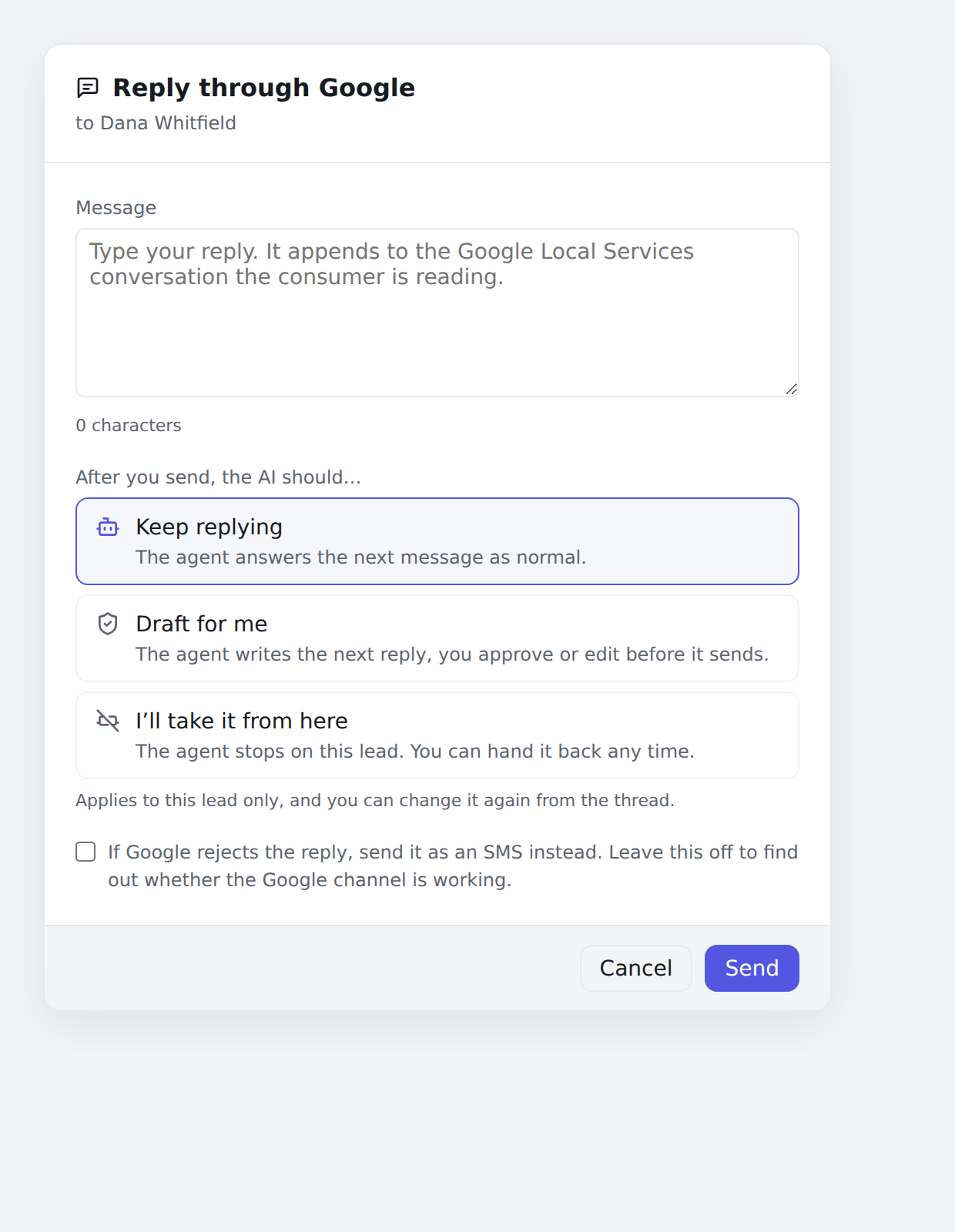
"After you send, the AI should…"
Three choices, applying to this lead only:
| Option | What happens next |
|---|---|
| Keep replying | The agent answers the consumer's next message as normal. |
| Draft for me | The agent writes the next reply and a person approves or edits it before it sends. |
| I'll take it from here | The agent stops on this lead. You can hand it back at any time. |
The control arrives set to whatever the thread is already on, so opening the panel and not touching it changes nothing.
If Google rejects the reply
Below the message box is If Google rejects the reply, send it as an SMS instead — off by default. Left off, a failed append fails visibly, which is what you want when you are checking whether Google's channel works. Turned on, the reply goes out as a plain text message to the consumer's number instead, and the panel tells you that is what happened.
Reply to a lead yourself — from settings
Useful for a lead the agent will not touch, such as one that predates your connection.
Settings → Channels → Google Ads · Local Services → Answer a lead yourself
The 25 most recent leads are listed newest-first by Google's own date. Pick one, type a reply, and send. Leads that cannot be answered say why — This consumer opted out, or that Google has marked the lead closed.
The approval queue
With Require approval before each AI reply on, the agent's drafts appear at the bottom of the settings page instead of sending. Each entry shows the consumer's message and the agent's proposed reply in an editable box.
- Edit the text if you want, then Approve & send.
- Reject discards it and nothing is sent.
- A lead marked AI paused after N messages — waiting for a person has hit its per-lead message limit. Approving its draft hands the thread back to the agent with a fresh allowance; so does replying yourself, or Resume AI on this lead in the Answer a lead yourself list. Admins are told when a lead is paused this way — the notification is A Google Ads lead is waiting for a person, and it can be turned off under notification preferences.
An empty queue with approval on reads New AI replies will appear here.
Reading the Performance panel
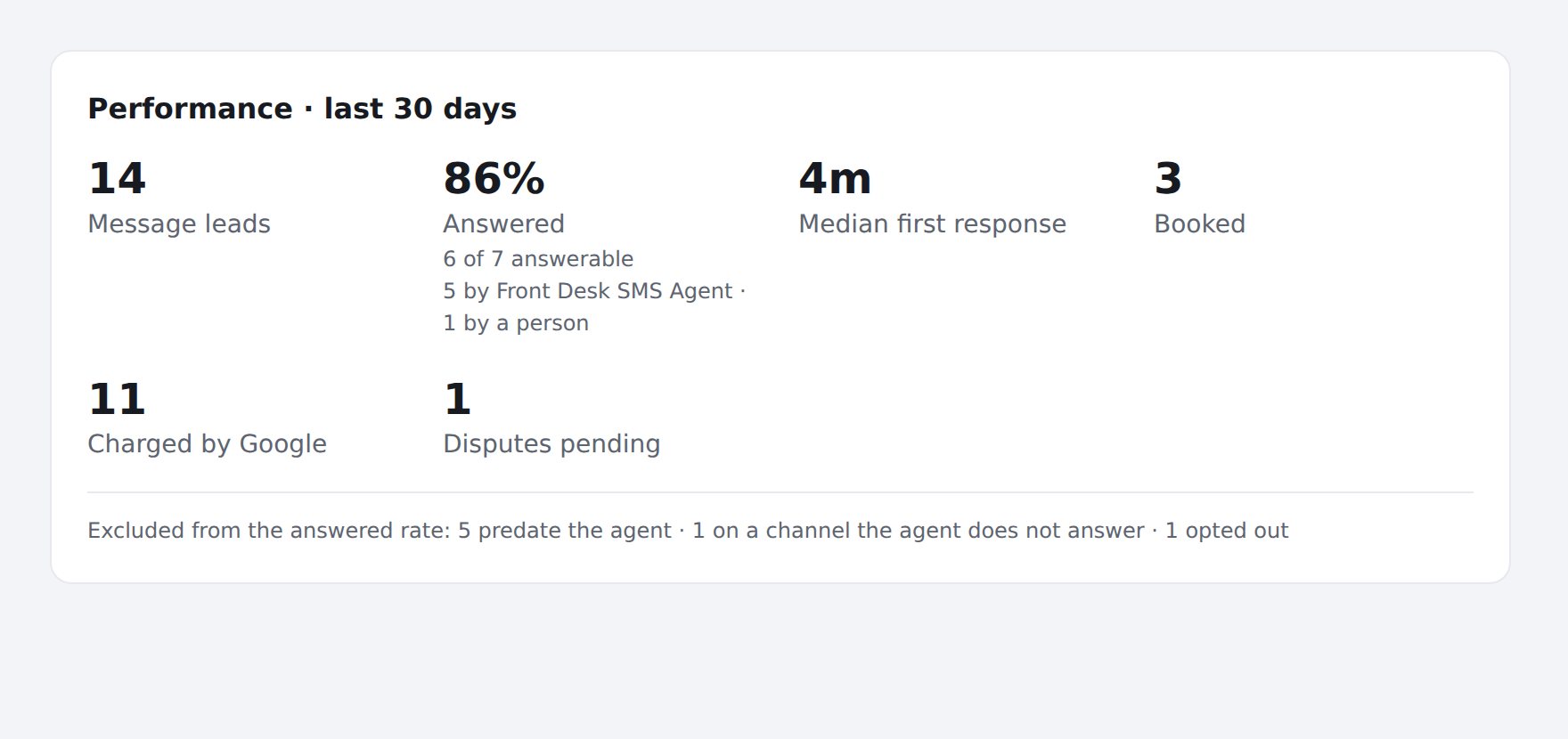
Settings → Channels → Google Ads · Local Services → Performance · message leads · last 30 days
The heading names its own scope on purpose: this panel covers message leads over the last 30 days, while the lifecycle page counts every lead kind over your chosen range — so the two can legitimately show different figures for what sounds like the same thing.
| Figure | What it means |
|---|---|
| Message leads | Leads that arrived in the last 30 days, by Google's timestamp — not when Karmaflow.ai recorded them. |
| Answered | Percentage of answerable leads that got a reply, with a split naming who replied. |
| Median first response | The middle wait between the consumer's message and the first reply. Google ranks on this. |
| Booked | Leads Google reports as booked. |
| Charged by Google | Leads you were billed for. |
| Disputes pending | Credit requests Google has not settled. |
The answered denominator excludes leads that were never answerable — those predating your connection, those on a channel the agent does not answer, and those where the consumer opted out. Each exclusion is listed under the panel. Counting them would report a broken agent when the truth is the leads were never eligible.
The split line names who replied, for example 3 by Two Way SMS Agent · 1 by a person. Only non-zero parts print. A part reading 2 before we recorded who means those leads were answered before Karmaflow.ai tracked authorship — it shrinks on its own and never grows.
Troubleshooting
The answered rate is 0% and there are answerable leads. Check that an answering agent is selected. The panel says explicitly when none is bound.
A reply says it was sent by SMS instead of Google. The append failed and your fallback number caught it. The consumer got the message as a text, but it does not appear in the Local Services conversation. Press Check reply capability in settings to test whether Google is accepting replies at all.
The median first response looks far too long. Check whether the leads in the window include ones imported from before you connected — those were deliberately never answered.
Replies stopped on one lead. Check the transcript for the takeover banner: someone may have taken the thread over. See Human takeover.