CRM Overview
Records and pipelines, conversation memory, AI intelligence, forecasting, and governance — what the CRM covers and why teams use it.
CRM
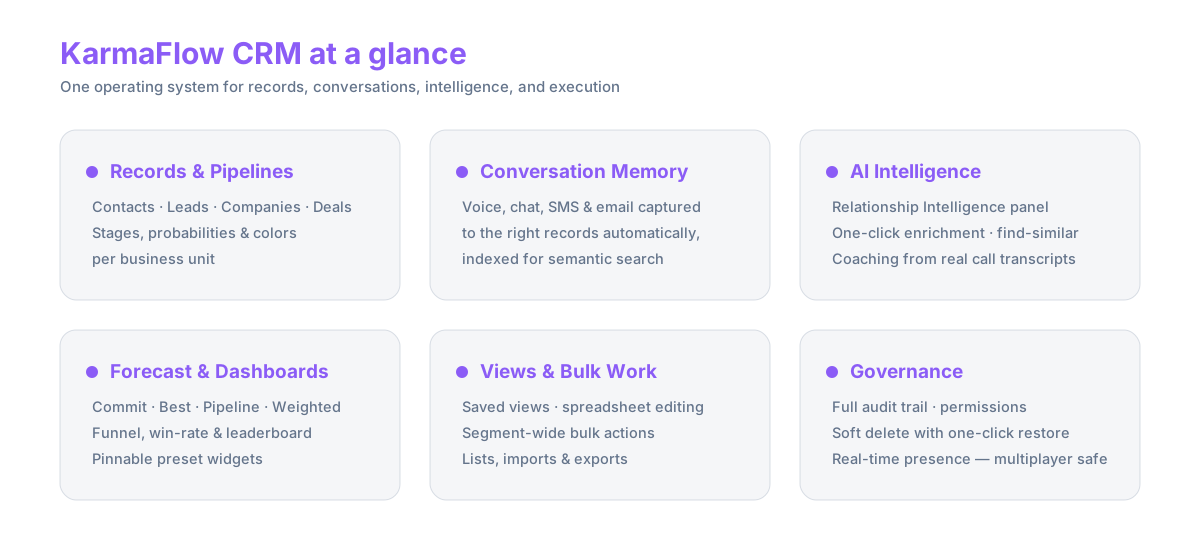
Karmaflow.ai includes a CRM designed to keep customer records, pipeline activity, outreach, and next steps connected in one operating system. Every conversation across voice, SMS, chat, and email feeds the same contact, company, and deal records — so the next follow-up is grounded in the full history without anyone copy-pasting between tools.
flowchart LR
  voice[Voice calls] --> capture[Conversation capture]
  chat[Chat sessions] --> capture
  sms[SMS threads] --> capture
  email[Email] --> capture
  capture --> contacts[Contacts & leads]
  capture --> deals[Deals]
  contacts --> companies[Companies]
  deals --> pipelines[Pipelines & stages]
  contacts --> tasks[Tasks & follow-ups]
  deals --> forecast[Forecast & dashboards]
What It Covers
| Record | What it carries | AI on it |
|---|---|---|
| Contacts & leads | Full interaction history, lifecycle stage, tags, custom fields | Lead scoring, find-similar, one-click enrichment, Relationship Intelligence |
| Companies | Shared account context grouping related contacts | Find-similar, AI-research fields |
| Deals | Pipeline stage, value, probability override, expected close date | Relationship Intelligence, hot-list ranking, stuck-deal detection |
| Pipelines | Stages, default probabilities, colors, won/lost flags — per business unit | Drives the weighted forecast |
| Tasks | Follow-ups with start/due/reminder dates, priority, tags, and recurrence, tied to records | Created by humans, agents, and automations |
| Lists | Reusable segments built by hand, import, or filtered select-all | Target audiences for email strategies, voice campaigns, and orchestrations |
Records That Stay Current on Their Own
Most CRMs are only as good as the notes people remember to type. In Karmaflow.ai, every voice call, chat session, SMS thread, and email is captured against the right records automatically and indexed for semantic search. On top of that live record you get AI-research custom fields — define a field once ("What does this company sell?"), then click Enrich on any contact, company, or deal to fill it from your own data plus optional web search — find-similar panels, auto-tagging, and a smart timeline that surfaces what matters instead of everything in date order.
Pipelines That Model Your Motion
Deal stages are configurable per business unit: names, order, colors, default win probabilities, and won/lost flags. A renewals book doesn't move through Discovery → Proposal, and it doesn't have to — each pipeline renders its own kanban board, and individual deals can override the stage probability when a rep knows better.
A Forecast You Can Defend
The forecast reads deal and pipeline data directly — no AI guesswork, no exported spreadsheet — so the numbers always match the records underneath:
- Commit — open deals at ≥ 75% effective probability
- Best case — open deals at ≥ 50%
- Pipeline — every open deal
- Weighted — value × probability across the board
Behind the tiles: a per-stage funnel with deal age, win rate by source computed only on settled outcomes, and a per-rep leaderboard. The same metrics ship as preset dashboard widgets — forecast tiles, leaderboard, funnel, activity per rep, a lifecycle ladder from Subscriber to Evangelist, stuck-deal alerts, and a hottest-deals list — that each user pins into their own daily board.
flowchart LR
  deals[Deals on per-pipeline kanbans] --> engine[Forecast engine<br/>stage probabilities + overrides]
  engine --> tiles[Commit · Best · Pipeline · Weighted]
  engine --> funnel[Funnel by stage + deal age]
  engine --> winrate[Win rate by source]
  engine --> board[Leaderboard by rep]
  tiles --> dash[Pinnable CRM dashboards]
  funnel --> dash
  winrate --> dash
  board --> dash
Work the List Like a Spreadsheet
Saved views store filters, sort, and column layouts per entity — built visually or in an advanced JSON editor for power users. The table itself edits inline like a spreadsheet, bulk actions operate on an entire filtered segment ("select all matching", not just the visible page), and CSV import brings existing books in. Lists you build here are the same audiences your email strategies, voice campaigns, and orchestrations run against.
Intelligence Above the Data
Open any contact or deal and the Relationship Intelligence panel gives you a current read — temperature, buying intent, direct signals, risks, and the recommended next move — assembled from everything already in the record. Semantic search finds records by meaning, coaching feedback is grounded in what your top performers actually said on calls, and presence chips show who else has a record open while you're in it.
What's Different
- Memory, not data entry. Conversations become record history automatically; your AI agents and your reps work from the same memory.
- Judgment, not just search results. Relationship Intelligence answers "what should I do next, and why?" — not "what's in this record?"
- Forecast from the source of truth. Commit/best/weighted come straight from live deal data, with the math visible.
- Enrichment you define. AI-research fields are your questions, answered from your data — not a generic data-vendor append.
- Multiplayer by default. Presence, audit trail, and soft-delete restore make it safe for a whole team to work the same book at once.
Why Teams Use It
The CRM helps teams avoid fragmented customer context. Configurable pipelines, custom objects, and saved views adapt the system to how your sales motion actually runs, instead of forcing the motion to fit the tool — and because every channel writes to the same records, your AI agents are grounded in the same truth your reps see.
Business Outcomes
- Better visibility into pipeline and relationship activity
- Stronger continuity between outreach, customer records, and follow-up work
- Faster ramp for new reps via auto-surfaced relevant context
- Cleaner forecasting on commit / best / weighted pipeline
- Coaching feedback grounded in what your top performers actually said on calls
- Compliant audit trail without manual logging
Learn More
Go deeper on the judgment layer in Relationship Intelligence, or see how the CRM feeds your voice, chat, and SMS agents and the Tenant Brain.
To get your team's email onto contact timelines automatically, see Routing Your Email Into Karmaflow.ai — step-by-step for Google Workspace and Microsoft 365.
Ready to work in it? Step-by-step guides — contacts, deals, pipelines, saved views, forecast, dashboards, importing, automations, and more — are in the signed-in documentation. Sign in to Karmaflow.ai to read them.