Reviewing what your team teaches
Handle what your colleagues submit, undo a published change, and set how much your agents may publish on their own.
Reviewing what your team teaches
When someone on your team corrects an agent, it arrives with you. This guide covers what to do with it, how to undo something that went live, and how to decide how much your agents may publish without asking.
Reading this before you have a workspace? Everything below describes what a reviewer does inside Karmaflow.ai. The permissions named are the ones a workspace admin grants — you do not need them to read on.
What you'll need
quality:events:readto see the quality stream and the Curator Inbox (the seeded Manager, Member and Viewer roles all carry it).quality:events:manageto promote, dismiss, or change the sharing setting.knowledge:brain:readto open concepts,knowledge:brain:manageto publish or roll back,knowledge:brain:governto change autonomy settings.
If a page below is missing from your menus, it is a permission — not a missing feature.
Where corrections arrive
There are three doors onto the same work. Use whichever suits how you are working.
| Door | Path | Best for |
|---|---|---|
| The conversation itself | Open the call/chat/email | Handling one thing you were told about |
| Training threads | Agents → Workflows → Quality Events → Training threads | Seeing everything your team has taught, with each thread's receipt |
| Quality Events | Agents → Workflows → Quality Events | Working the whole stream, and the Curator Inbox |
| Tenant Brain | Agents → Workflows → Tenant Brain → Approvals | Reviewing drafted knowledge waiting to publish |
Handling a correction in the conversation
Open the conversation and find the thread. You get the whole exchange: what they quoted, what they said, and what the AI already did about it — including who left it.
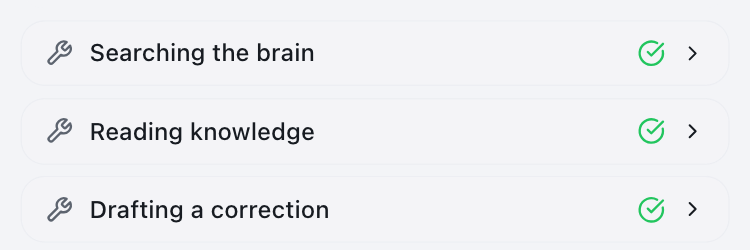
You can reply in plain language to direct the fix, exactly as the original author could. The AI shows its work as it goes:
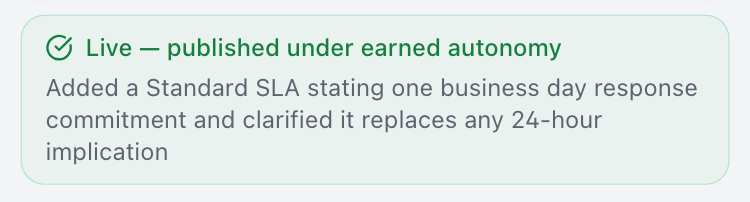
Then it reports the outcome. If your workspace's autonomy settings allowed it to publish, it says so plainly and names the authority it acted under:
The before-and-after on the original thread:


The person who left the correction sees that same receipt on their own Train the AI page — you do not need to tell them it was handled.
The Curator Inbox
Agents → Workflows → Quality Events → Curator Inbox
The Curator is the AI that works feedback about how agents behave — the prompt-change plane. It reads the feedback in context and proposes what should change about an agent's instructions.
It runs as a series of steps you can follow:

And it writes up what it found:
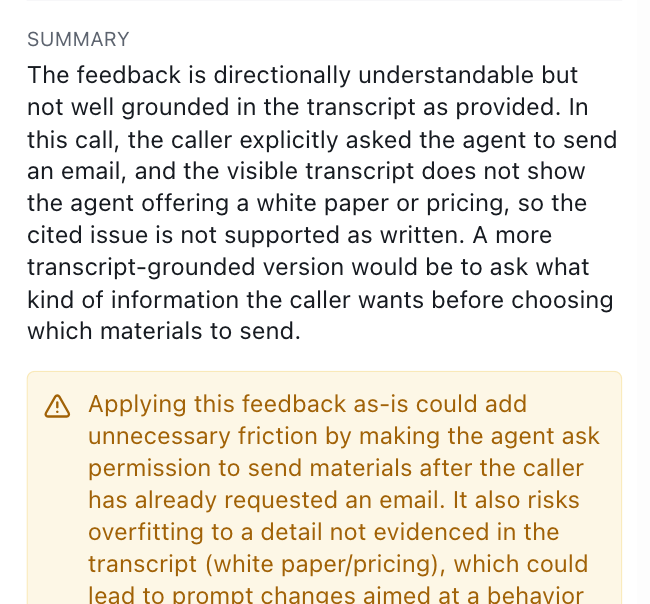
The Curator is allowed to disagree with the feedback, and that is a feature. In our own testing it declined to act on a style correction, saying it was not well grounded in the transcript and that applying it could "overfit to a detail not evidenced". It proposed no changes. An AI that refuses a weakly supported instruction is protecting your agents from being tuned by a single bad day — read its reasoning before overriding it.
Entries must be analysed before they appear in the inbox — the queue lists feedback the Curator has already worked, not raw submissions.
Publishing, and undoing
Corrections that become knowledge are ordinary revisions of a concept, so they are reviewed, published and undone through the knowledge base.
Agents → Workflows → Tenant Brain → open the concept → History.
Reading the history honestly
Each revision shows two separate times, and the difference matters:
- Written — when the revision was created.
- Published — when it actually went live and agents began reading it.
They are often hours apart, and a revision can be written and never published at all. Badges make the state explicit: live now, was live, never published, or no publish on record for revisions that predate publish tracking.
Never read a "Written" time as a publication. A revision existing does not mean it ever reached your agents.
Use Compare on any revision to see exactly what changed against the one before it, before you act on it.
Two ways to undo — they are not the same
| Revert (on an audit row) | Restore (in History) | |
|---|---|---|
| Where | Tenant Brain → Approvals, and inline in History while the window is open | Version History, any revision |
| When available | Only while an auto-publish's review window is open | Always |
| Goes back | Exactly one step | Any revision you pick |
| Effect | Immediate — live in one click | Stages an edit; needs a separate Publish |
Restore does not revert. It loads the old content into the editor as an unpublished edit — your agents keep reading the current version until you publish. The banner says so explicitly:

If you change your mind, Discard it instead puts everything back.
When you do publish a rollback, a confirmation names the live claim you are about to contradict and notes that publishing anyway is recorded against your name. Read it — it is the last chance to catch a wrong target.
Nothing is ever erased. A rollback is recorded as a new revision, with the change and the undo both visible in history, and the undone revision keeps its own Restore control so it can be brought back.
How much should agents publish on their own?
Agents → Workflows → Tenant Brain → Governance
This is where you decide how much autonomy your agents have. Options run from reviewing everything, through publishing only what a proposer has earned trust to publish, up to publishing verified high-confidence knowledge automatically with a review window for undo.
Two things worth knowing before you change it:
- It changes what your colleagues see. Under higher autonomy, a manager's correction may go live during the conversation; the thread reports that honestly rather than promising a review that will not happen.
- Not every automatic publish is individually queued for you. A sampled portion gets a keep-or-revert window; the rest publish cleanly. That is the point of autonomy — but it means the queue is not a complete record.
To see everything that published automatically — sampled or not — use the Auto-published list on the Approvals tab. It covers the last 30 days, needs no action, and offers the one-click Revert where a window is still open.
Sharing anonymised quality patterns
Agents → Workflows → Quality Events
Near the top is a checkbox: Share anonymized quality patterns with the platform.

It shares patterns, not content — the shapes of what tends to go wrong,
used to improve the platform for everyone. Read the sentence beside it for
exactly what leaves your workspace and what never does. Changing it requires
quality:events:manage; everyone else sees it read-only with a note saying
who can change it.
Troubleshooting
Someone says they left a correction and I can't find it. Open Quality Events → Training threads — every thread anyone has opened is listed there with its receipt, and each row links back to its conversation. (The Curator Inbox is not the place to look: it only lists feedback that has already been analysed.) If it is still missing, check whether the thread is on an agent type your role can read — the listing only shows agent types you hold read access on.
A correction published when I expected to review it. Check Governance. Under higher autonomy, a correction from someone with publish rights can go live immediately. The Auto-published list on Approvals shows what did.
I reverted something but the person's receipt still says "became knowledge". That receipt describes what happened at the time and does not currently update when a concept is later rolled back. If the correction mattered to them, tell them directly.
I rolled back but agents are still using the old text. You staged a Restore without publishing it. Look for the amber banner — the rollback completes on Publish.
Next steps
- Quality Events and the Curator queue — the two surfaces in depth: the full event stream with its filters and promote/dismiss controls, topic muting, and the per-agent Feedback Review workflow where a prompt change is approved and applied.
Related
- Agents that learn from your team — how the whole loop fits together.
- Training your AI agents — the overview and role model.
- What happened to your feedback — the receipts your team sees.
- Brain Browser walkthrough — operating the knowledge base itself.