What happened to your feedback
Every receipt explained, and the Train the AI page where everything you have taught is listed.
What happened to your feedback
Every correction you leave ends with a receipt: a short status line that says what actually happened to it. This page explains all of them, and shows you where to find everything you have ever taught.
The headline: more than one outcome is a success. A correction that was noted as a one-off did not fail — it was read, judged not to be a durable business fact, and closed honestly. The only genuine failure is a thread that shows no outcome at all.
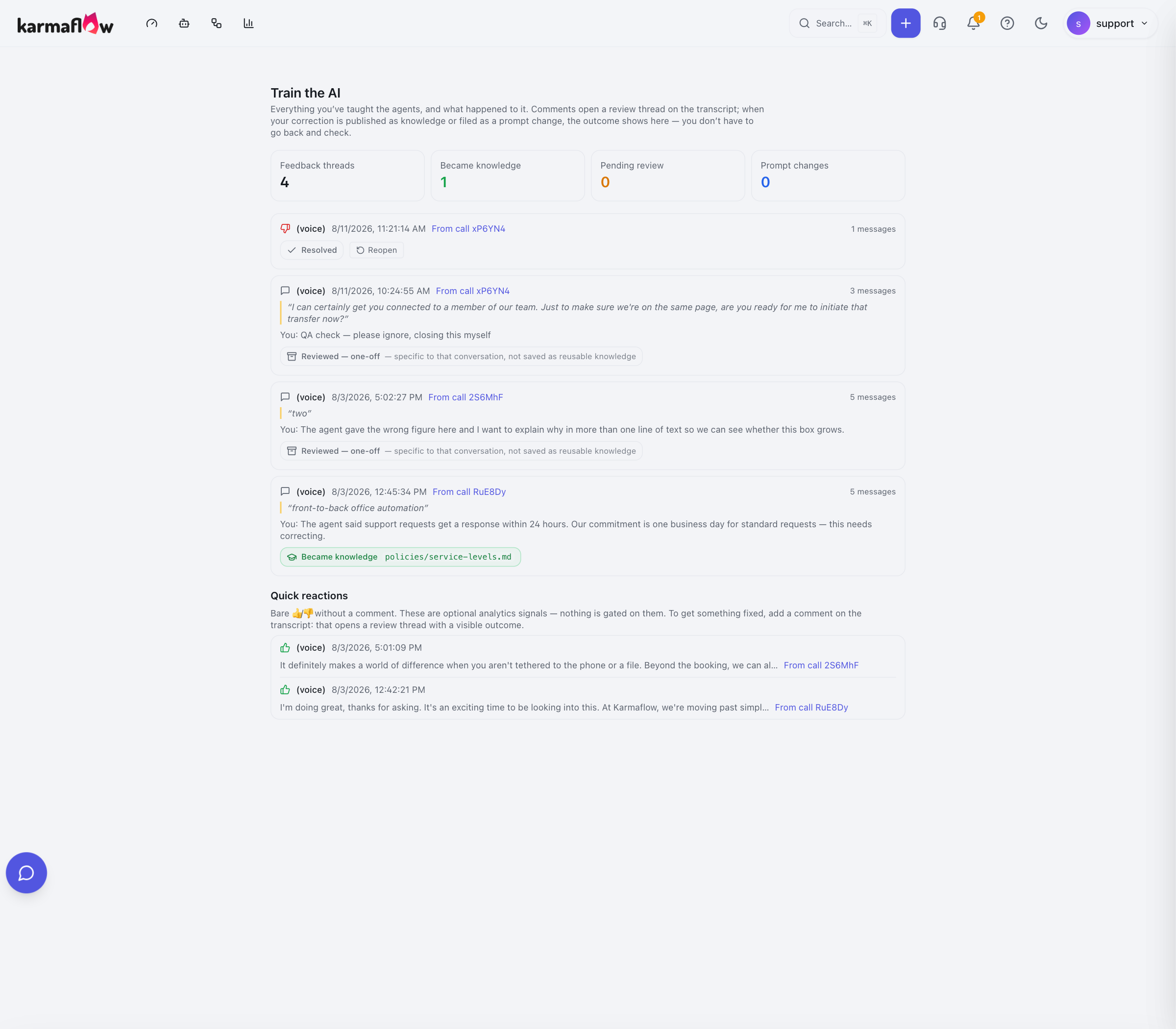
Where to find everything you've taught
Open the Agents menu in the top bar. Train the AI sits under the Workflows heading:
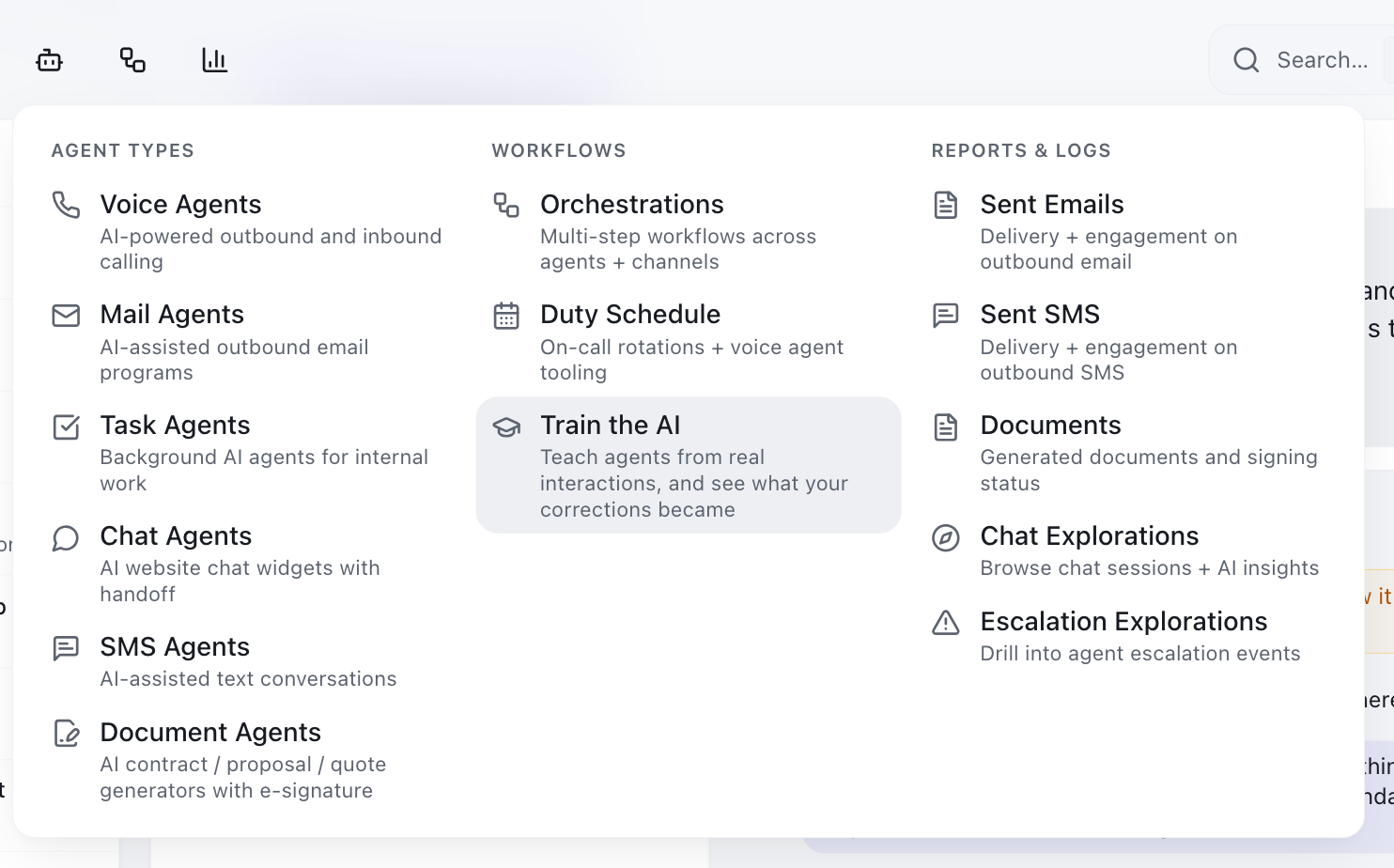
This page is available to everyone — you never need a permission to see what happened to your own feedback.
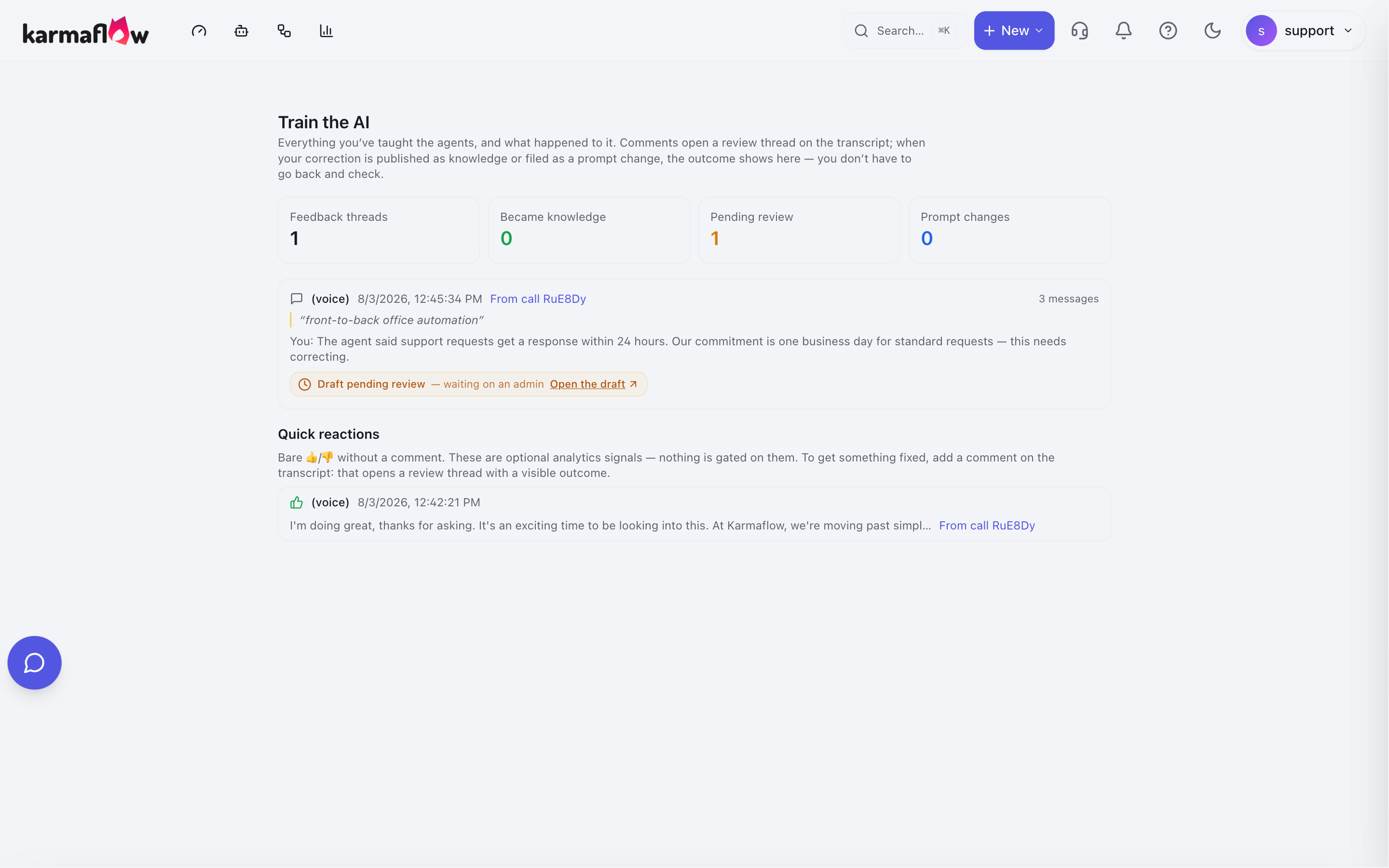
The four counters
| Counter | Counts |
|---|---|
| Feedback threads | Every correction thread you have opened |
| Became knowledge | Corrections now part of what your agents read |
| Pending review | Corrections drafted and waiting for a reviewer |
| Prompt changes | Corrections filed against an agent's instructions |
Below the counters, each entry shows the phrase you quoted, your comment, and the outcome badge:

Further down, a Quick reactions section lists your bare 👍/👎 ratings — the ones you gave without writing a correction. These are counted as signal; nothing is gated on them individually.
Every receipt, explained
The same wording appears in two places — on the original conversation, under the message you corrected, and on the Train the AI page. The two always agree. If they ever disagree, that is worth reporting.
🟢 Became knowledge
This became knowledge —
<name>. Thank you for teaching it.
Your correction is now part of the Tenant Brain. Every agent that reads that knowledge will use your corrected version from now on.

The entry offers Open the concept so you can read what your feedback produced. The thread also closes — the question it opened has been answered. To raise something else about the same message, start a new comment.
If the name is plain text instead of a link, your role does not include access to the knowledge base. The correction still landed exactly as described; hover the text and it will tell you that a workspace admin can grant access.
🟠 Draft pending review
Draft created from this — waiting on an admin to review it.
Your correction has been written up as a draft and is queued for someone with review permission. This is the normal outcome for a member, whose corrections are deliberately held for a second pair of eyes.

What to do: nothing. It is in the queue. If it is urgent, tell a manager or admin which conversation it came from — they can find it in their review queue.
🔵 Filed as a prompt change
Filed as a prompt change — an admin actions this on the agent's instructions.
The AI judged your correction to be about how the agent speaks or behaves rather than about a fact — tone, length, pacing, repeating itself, being too pushy. Those are fixed in the agent's instructions, not in the knowledge base.

The entry links you to where it landed, so you can follow it if you want to.
If you disagree — if you meant it as a business fact and it was read as style — reply in the same thread and say so plainly: "This is a business fact, not a tone issue: our commitment is X." The AI will reconsider.
⚪ Reviewed — one-off
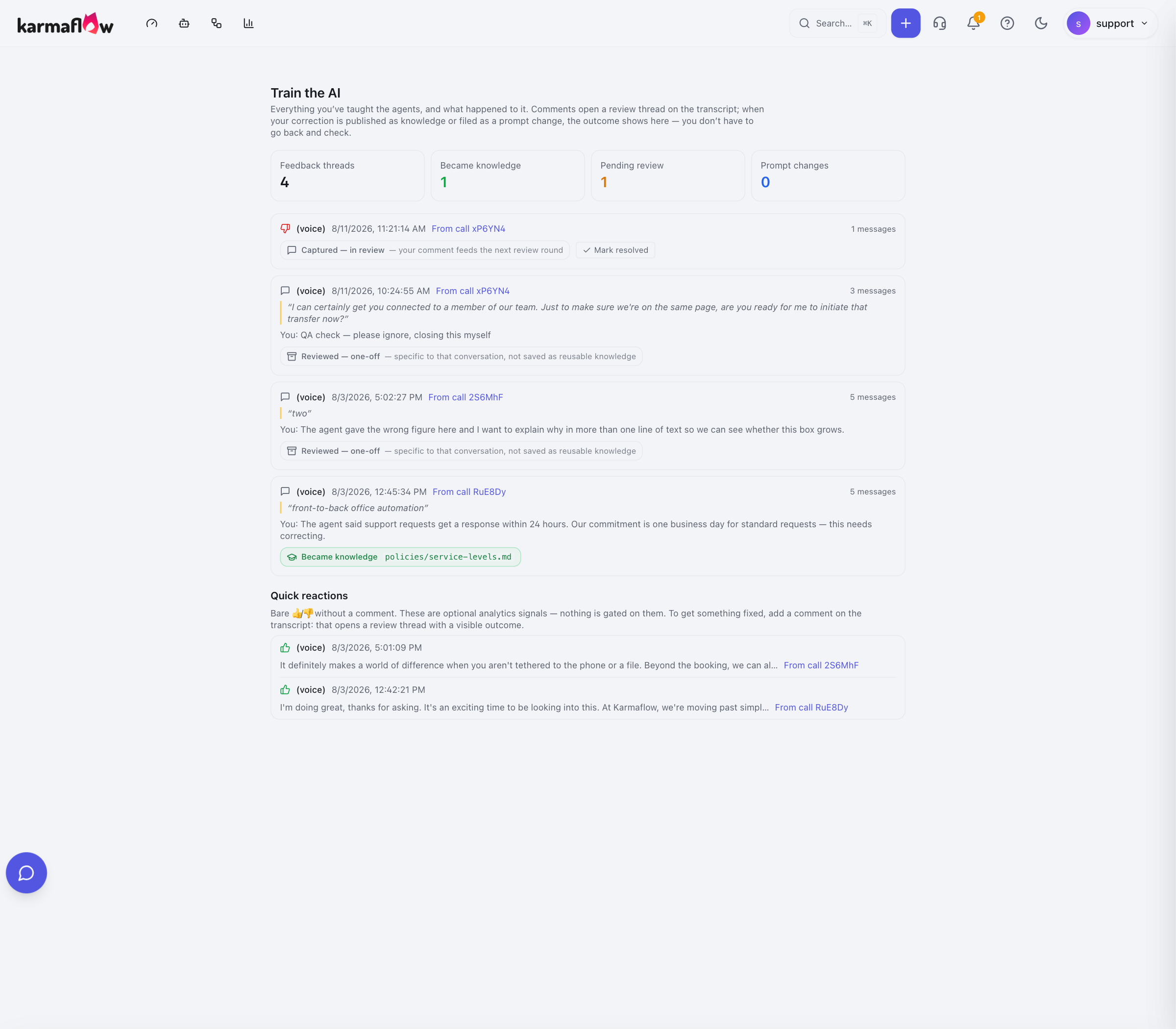
Reviewed — one-off — specific to that conversation, not saved as reusable knowledge.
The AI read your correction and concluded it was true only of that one conversation. Nothing was changed, deliberately.
This is a successful outcome. It is the system protecting your knowledge base from absorbing details that do not generalise — a caller's misspelled name, a one-time exception, a detail specific to a single deal.
If you disagree, reply in the thread and explain why it is a standing rule. Be explicit: "This applies to every customer, not just this one."
⚪ Captured — in review
Captured — in review — your comment feeds the next review round.
Recorded, and not yet sorted into one of the outcomes above.
What actually moves a thread out of this state is your reply. The AI reads and classifies a thread when you answer it — so a thread you started and then left alone stays Captured — in review rather than resolving on its own. This is the state you will see if you clicked 👎 and closed the tab without typing anything: the thread exists, your signal is recorded, and it is waiting on you.
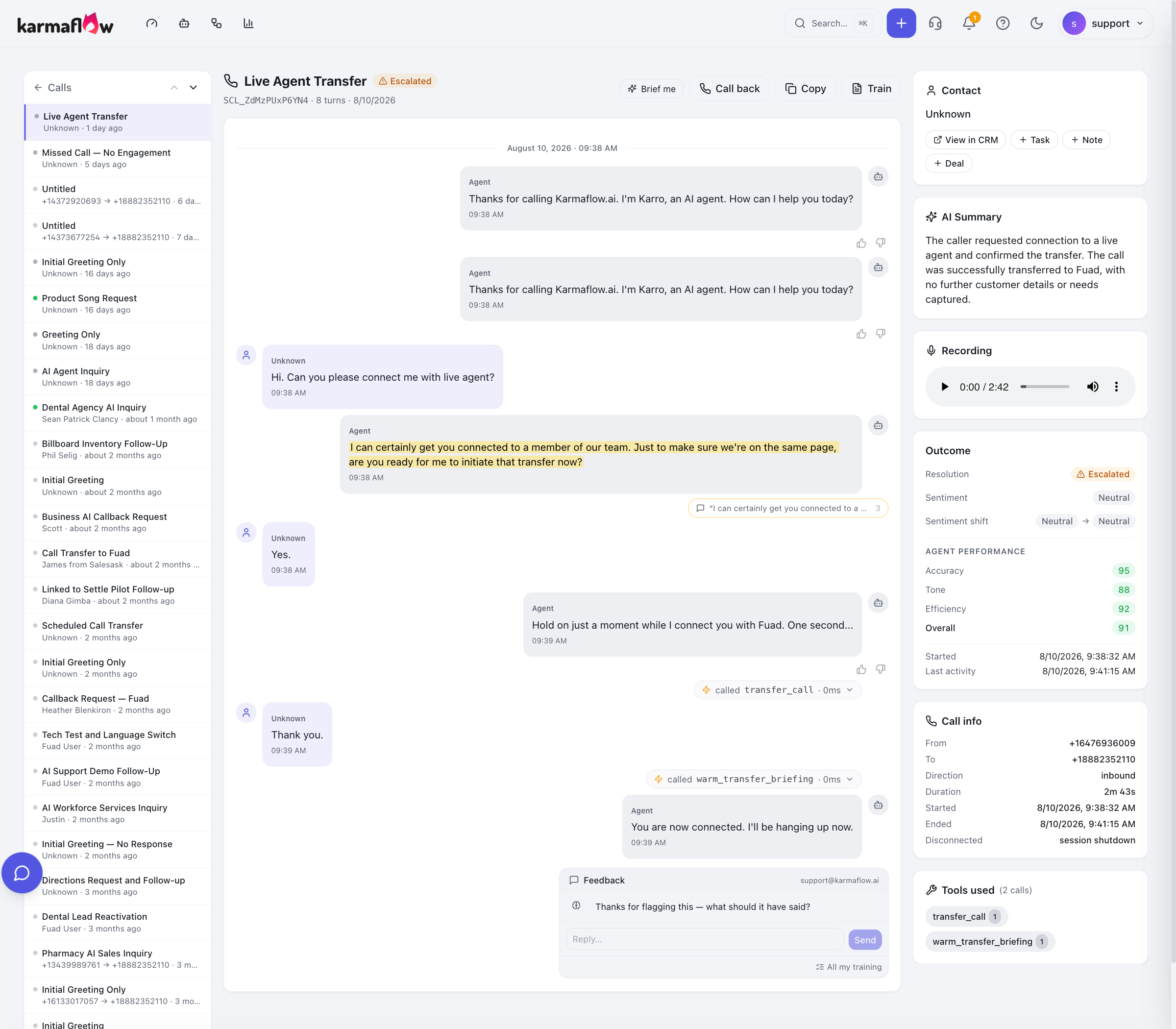
That is not a fault, and there is nothing to fix — a bare 👍 or 👎 is a perfectly good signal on its own. But if you meant to explain something, the thread is still waiting for it, and typing your correction is what turns it into knowledge or a prompt change.
Closing it yourself. While a thread is in this state, its entry on your Train the AI page carries a Mark resolved button. Use it when the question answered itself — you found the real explanation, or the point no longer matters. Closing it keeps everything you wrote as quality signal.
⚪ Resolved
The thread was closed without producing a knowledge or prompt change — by you, by a reviewer, or by the AI. Its content is still counted as quality signal.
The badge changes in place, with no page reload, and the row's only button becomes Reopen.
If you closed it too soon, Reopen puts it straight back into Captured — in review, exactly as it was.
You can always close your own. Resolving and reopening your own threads needs no special permission — do it from Agents → Workflows → Train the AI. Closing someone else's thread needs
quality:events:manage, which is why the team-wide Training threads tab shows no buttons for most people, not even on their own rows.
Reading it as a table
| Badge | Means | Anything for you to do? |
|---|---|---|
| Became knowledge | Live — every agent reads it now | No. Optionally open the concept and check it reads right |
| Draft pending review | Written up, queued for a reviewer | No. Chase a manager only if urgent |
| Filed as a prompt change | Filed against the agent's instructions | No, unless you meant it as a fact — then reply and say so |
| Reviewed — one-off | Judged specific to that conversation | No, unless it is a standing rule — then reply and say so |
| Captured — in review | Recorded, not yet processed | No. Check back |
| (nothing at all) | Genuine failure | Report it |
Common questions
Why did my colleague's identical correction publish while mine is waiting? Roles differ. Members' corrections always land as drafts; managers' and admins' may publish immediately depending on your workspace's autonomy settings. Both are working as designed — see Training your AI agents.
I corrected something and the agent said it again. Check the receipt first. If it was a one-off or a prompt change, the knowledge was never changed. If it did become knowledge, the agent may have been answering from a different concept — reply in the thread naming what it said, and the AI will look again.
The Train the AI page and the conversation disagree. They should never disagree. Report it.
Can I delete something I taught? Not from this page. A published correction is undone by a reviewer through the knowledge base's version history — see Reviewing what your team teaches.
I can't open the concept my feedback produced. That link needs knowledge-base read access. Your correction still landed; ask a workspace admin for access if you need to read it.
Next steps
- Reviewing what your team teaches — if you are the person handling the queue.
Related
- Training your AI agents — the overview and role model.
- Where you can train — every surface.
- Brain Browser walkthrough — the knowledge base itself.