Set up conversation learning
Schedule investigations, answer guidance requests, publish evaluated skills and rehearse a shorter system prompt for a chat agent.
Conversation learning helps a published chat agent improve from patterns across completed chats. For example, one review might show that a service site was saved incorrectly. A scheduled investigation can check how often that happened, examine the cases and evaluate instructions the agent could use the next time a customer gives two addresses.
Set up the learning schedule
You need management access to the published chat agent and access to the records behind its cross-conversation findings. Your workspace must have Conversation review and learning enabled.
- Open Settings → Agents & AI → Conversation learning and select the chat agent. Open Conversation learning (sign-in required).
- Under Workflow settings, select Review completed conversations. This starts the review history the learner examines. How to check an individual review
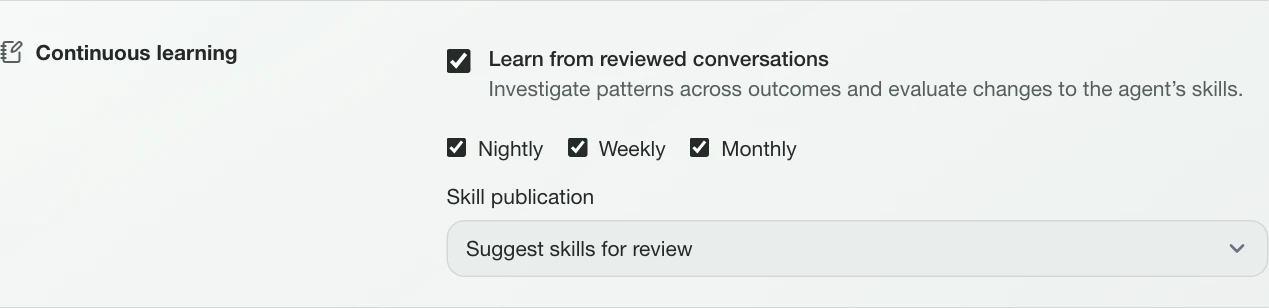
- Under Continuous learning, select Learn from reviewed conversations and choose Nightly, Weekly or Monthly as needed. Nightly investigations examine a completed workspace day. Weekly and monthly investigations use the broader period’s measurements and earlier findings to confirm or revise an interpretation.
- Under Skill publication, choose Suggest skills for review if you want a person to decide on each candidate. Choose Publish qualifying skills automatically to let eligible revisions go live after evaluation. A newly drafted tenant procedure still requires explicit human approval.
- Select Save workflow. A workspace administrator can separately set Monthly limit (USD) under Workspace budget and choose Save limit. The budget is shared across agents using conversation review and learning. Reusing a completed investigation on unchanged evidence incurs no additional charge.
Investigate a pattern or answer a question
- Open Investigations and choose a period. Read the question and result, then expand Daily coverage to see how many eligible chats were reviewed. A period can finish without a verified finding.
- Open the supporting reviews. When a broader review updates a finding for overlapping dates, follow its link for the newer interpretation. If the underlying evidence changed, select Open the corrected investigation on the earlier result.
- Open Guidance if the worker raised a question. Check its evidence and Decision history. For example, a second lookup could be a needless retry or a reasonable response to the customer changing the date.
- Under Your decision, choose Answer the question, Keep for human decision, Mark resolved or Decline the suggestion. Enter your answer in Guidance for the worker and select Record decision.
An evidence gap can resolve when later chats or tool receipts answer the question. An unanswered question gains no authority with age. A business decision or an explicit requirement for human approval stays with a person.
Evaluate a skill and use it in conversation
- Open Skills and select a revision. Expand Skill files to read its instructions and references. Under Evaluation, inspect the cases and open Evidence to check the reviewed chats.
- Under Publication decision, select Publish evaluated skill, Hold for guidance or Decline. A failed evaluation or changed supporting guidance can prevent publication.
- Check Live revision to see which revision the agent can use. During a chat the agent sees a short skill index and can load the relevant instructions and references when the task calls for them. The scheduled worker uses the review history to improve future revisions.
- If you need to take a live revision out of use, choose Restore previous skill when an earlier revision is available, or Withdraw revision when there is none.
Try a shorter system prompt
Once a published skill covers a recurring task, you can test whether the agent still handles it with shorter system instructions.
- On the skill, expand Rehearse a shorter system prompt when available and select Start from current instructions.
- Edit Proposed agent instructions and select Run comparison. The rehearsal compares the original setup with your proposed prompt and the published skill on up to six held-out cases. Each replay records its cost.
- Compare improvements, regressions and inconclusive cases. Open the source conversation for any regression. If the instructions, skill or supporting reviews have changed, run the comparison again before deciding.
- If you decide to adopt the shorter prompt, select Open agent editor, make the edit and publish it yourself. Running a comparison leaves that publication decision with you.
If the investigations list is empty, check the agent’s saved cadence, whether a workspace period has completed and whether it contains eligible reviews. If you see Workspace evidence is restricted, ask a colleague with access to the underlying records to review the finding. Conversation reviews · After-chat actions