Review a completed chat
Check what a chat agent was expected to do against the transcript, tool calls and saved records, then record your own verdict.
A conversation review checks whether a published chat agent did what its instructions and the customer’s final request called for. Use it when a transcript sounds right but you need to know what actually happened. A customer might correct a service address, for example, while the saved form still shows the original address.
Turn on review for a chat agent
You need access to the published agent and permission to manage it. Your workspace must have Conversation review and learning enabled.
- Open Settings → Agents & AI → Conversation learning. Open Conversation learning (sign-in required).
- Select the chat agent at the top of the page. Each agent has its own workflow.
- Open Workflow settings and select Review completed conversations.
- If you want the reviewer to check a specific expectation, enter it in Additional review criteria. For a service intake, try “When the customer gives two addresses, check which one was saved as the service site.”
- Select Save workflow. Look for Workflow saved. Reviews appear after eligible new chats close and the worker processes them.
Check a result and record your verdict
- Open Reviews for the same agent and select a conversation.
- Read Expected and observed. The worker compares the instructions captured for that chat, including applicable platform rules and agent instructions, with the conversation, tool calls and available destination receipts. Expand the evidence sources under an observation to see what supports the explanation.
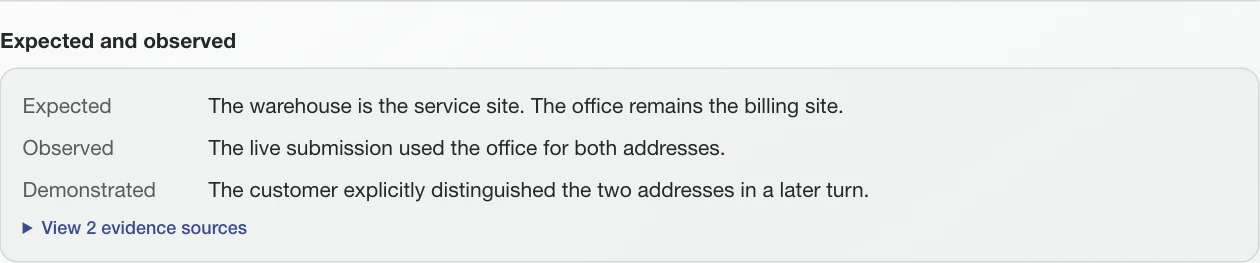
- Check Recorded fields when a destination saved data. In the example below, the customer changed the service site to the warehouse and kept the office for billing. The saved form used the office for both. Open conversation takes you to the transcript to check the customer’s wording.
- Check Evidence coverage before drawing a conclusion. A missing destination receipt can leave the outcome unknown. Questions for learning flags issues worth investigating across chats, such as repeated tool attempts.
- To add a staff judgment, open Staff review, select Your verdict, explain What did you observe?, then select Record verdict. Choose Missing evidence if the records cannot establish the outcome. The saved verdict and reason stay with the review.
If you cannot find a review
- No conversation reviews yet — check the agent and its saved workflow. Look for a production chat that started after you enabled review and has since closed. Live Preview chats and conversations cleared by transcript retention are excluded.
- Conversation learning is paused or locked — ask your workspace administrator to check feature availability for the workspace. A workspace admin can also check billed and reserved usage under Workflow settings → Workspace budget.
- A colleague sees evidence you cannot open — your chat-agent and underlying record access determine what you can inspect. Ask an authorized colleague to verify the source.
To act on a final request, configure an after-chat action. To investigate patterns across the review history, set up continuous learning.