Connect Google Analytics 4
The Google Analytics 4 page has five numbered sections, and you work them top to bottom: connect a stream, decide what identity and privacy options apply, choose which events go to GA4, do the two things only you can do on Google's side, and then watch the delivery log. This article walks each section with its exact labels.
What You'll Need
- A tenant administrator account. The page is admin-only.
- Edit access to the GA4 property you want events in, to create an API secret and later mark key events.
- Your GA4 web data stream's Measurement ID, which looks like
G-XXXXXXXXXX. Not aUA-orGTM-id. - A Measurement Protocol API secret for that stream. In GA4: Admin → Data streams → your web stream → Measurement Protocol API secrets → Create. Copy the secret value; KarmaFlow stores it encrypted and never shows it again.
- Your Google tag on the website (gtag.js or Google Tag Manager) if you want events attributed to the visitor's session. See Installing the tracker for the KarmaFlow side of the capture.
Where the page is
Settings (the gear icon, top right) → Integrations → Google Analytics 4 (sign-in required: /settings/google-analytics)
A short callout at the top, Before you start, on Google's side, reminds you that the GA4 property must be linked to Google Ads with Enable Personalized Advertising on, and that auto-tagging must be on in Ads. Those are one-time settings in Google; the article returns to them in section 4.
Section 1 — Connect a GA4 web data stream
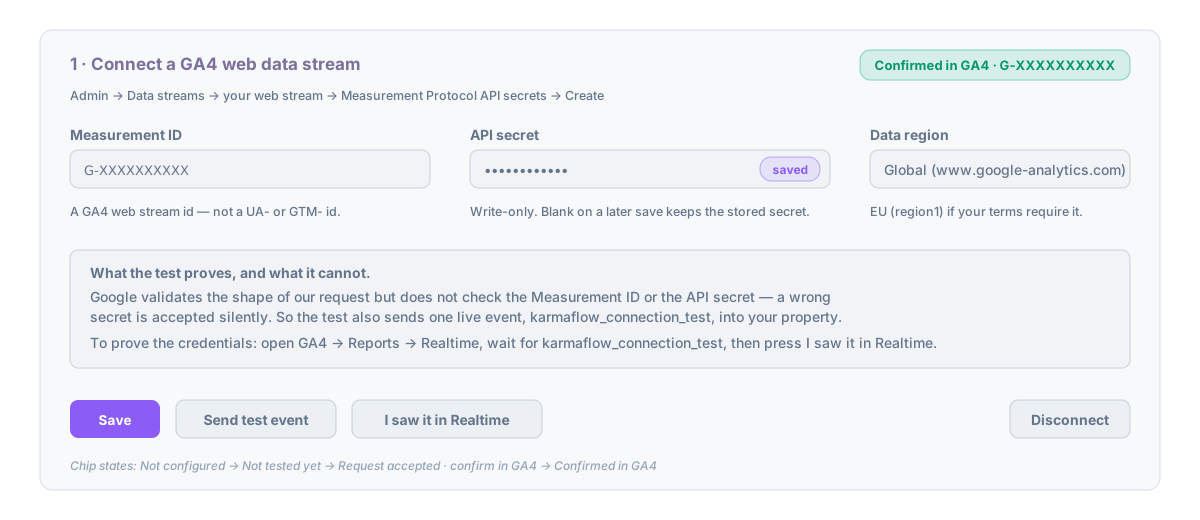
- Enter the Measurement ID. The field validates the shape as you type; a wrong shape shows Must look like G-XXXXXXXXXX under it and Save stays disabled.
- Paste the API secret. It is write-only: once saved, the field shows a saved marker and stays blank. Leaving it blank on a later save keeps the stored secret.
- Choose the Data region: Global (www.google-analytics.com) or EU (region1.google-analytics.com). This is the endpoint KarmaFlow's servers send to. Pick EU if your data-processing terms require requests to terminate in the EU; it does not change what GA4 stores.
- Press Save, then Send test event.
What the test proves, and what it cannot. Google checks the shape of the request on its validation endpoint but does not check the Measurement ID or the API secret: a wrong secret is accepted silently. So the test does two things. It validates the request shape, and it sends one live event named karmaflow_connection_test into your property. The status chip then reads Request accepted · confirm in GA4.
- In GA4 open Reports → Realtime, wait for
karmaflow_connection_testto appear (usually under a minute), and press I saw it in Realtime on the KarmaFlow page. The chip becomes Confirmed in GA4 · G-….
The chip states, in order: Not configured → Not tested yet → Request accepted · confirm in GA4 → Confirmed in GA4. Sends can be turned on from the Request accepted state onward; the confirmation is your proof, not a gate.
Disconnect forgets the API secret and turns sends off. It is not the way to pause; that is the master switch in section 2.
Section 2 — Sending, identity and privacy
Each box saves as soon as you tick it.
| Toggle | Default | What it does |
|---|---|---|
| Send events to GA4 | off until a test has been accepted | The master switch. Off keeps everything configured but sends nothing; the way to pause while you investigate a property. |
| Dry run (validation endpoint only) | off | Every event goes to Google's validation endpoint and lands nowhere. Rows in section 5 are marked (dry run). You will not see these events in Realtime or DebugView. Useful for a day, then turn it off. |
| Send the contact id as GA4 User-ID | on | Lets GA4 join one person across browsers when the property's reporting identity is Blended or Observed. The value is KarmaFlow's own id, never an email or phone. |
| Also send events for contacts with no captured web identity | off | Uses a stable synthetic client id per contact. GA4 counts each such contact as a new user with no traffic source, which inflates user counts and dilutes rates. Off means those events are listed as Not sent, no web identity. |
| Attach hashed email and phone (user-provided data) | off | SHA-256 hashes only, never for a contact marked Do Not Contact. Requires User-provided data collection to be on in the property (GA4 Admin → Data collection and modification → Data collection). |
| Send Consent Mode v2 signals with every event | on | Every event carries ad_user_data and ad_personalization: DENIED for a contact marked Do Not Contact, GRANTED for everyone else. KarmaFlow records opt-outs, not opt-ins. If you need recorded positive consent, keep your consent platform as the source and turn this off; then no consent block is sent. |
Below the toggles, Default currency for values without one (three-letter code, its own Save) is used when an event carries a value but no currency.
Section 3 — Which events go to GA4
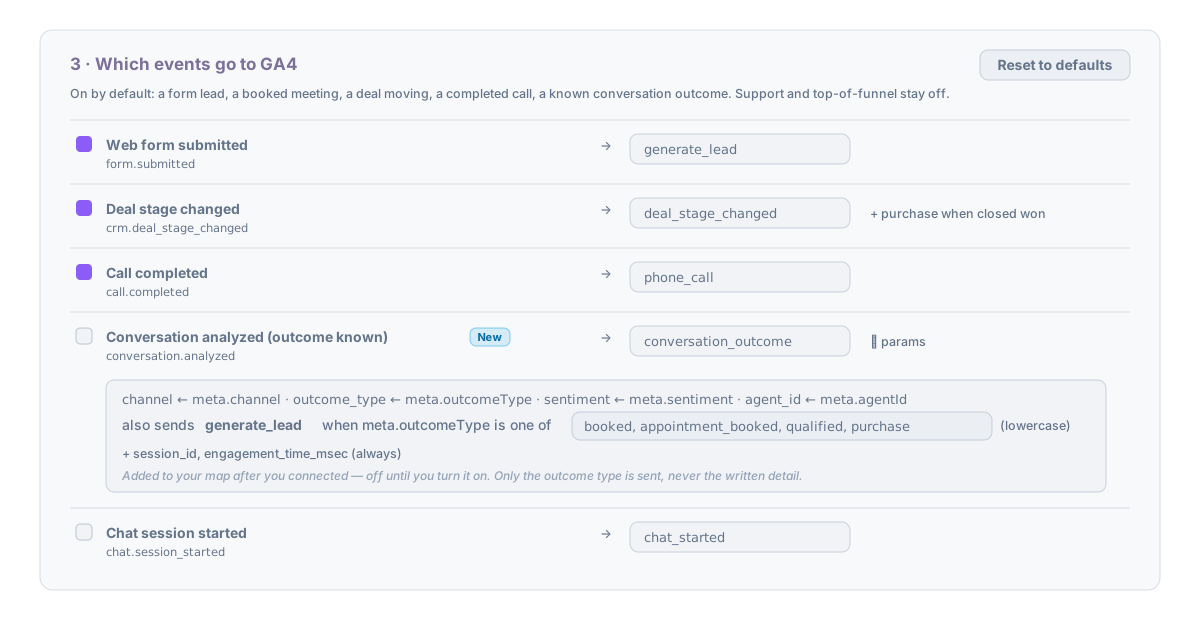
Each row is one KarmaFlow trigger, with a checkbox, the GA4 event name (editable, letters, digits and underscores, starting with a letter, at most 40 characters, not a name Google reserves) and an expander listing the parameters that ride along. Before a stream is connected the map is read-only and shows what you would get out of the box.
Defaults, chosen so Smart Bidding learns from value rather than volume:
| Trigger | GA4 event | On by default |
|---|---|---|
| Web form submitted | generate_lead |
yes |
| Meeting booked | meeting_booked |
yes |
| Deal stage changed | deal_stage_changed, plus purchase with value and currency when the deal closes won |
yes |
| Call completed | phone_call (direction, duration, who answered) |
yes |
| Conversation analyzed (outcome known) | conversation_outcome (channel, outcome type, sentiment, agent id), plus generate_lead when the outcome type is in your list |
yes for new connections; New and off for workspaces connected earlier |
| Chat session started | chat_started |
no |
| SMS received | sms_inbound |
no |
| Ticket created / solved, CSAT, lifecycle changes, deal created | as named | no |
The Conversation analyzed row has one extra control: also sends generate_lead when meta.outcomeType is one of followed by a comma list, default booked, appointment_booked, qualified, purchase. Type your own analytics prompt's outcome types, lowercase, and click away or press Enter to save. Only the outcome type is ever sent; the written outcome detail never leaves KarmaFlow.
Give an outcome a value
Smart Bidding bids to value only when the key event carries one. Out of the box only purchase does (the deal's own amount). For everything else, open a row's params and use value by rule: when a field = some text → value. Each rule is one line: pick the field (for the Conversation analyzed row, outcome_type), type the text to match (booked), and enter what that outcome is worth to you in your default currency (250). + a rule for each listed outcome pre-fills one line per outcome type in the row's generate_lead list, so you only type the numbers. Matching ignores case; an outcome with no rule sends no value; when the event already carries a number (a deal amount) that number wins. The value goes on the row's event and on the generate_lead it triggers, so whichever of the two you mark as a key event bids to it. Press Save event map.
Rows marked New were added to your map after you connected. They arrive off; tick the box when you want them.
Reset to defaults restores the shipped map. Every row also sends session_id and engagement_time_msec, which GA4 needs to place the event in a session.
Section 4 — On Google's side (we cannot do these for you)
- Link the GA4 property to Google Ads and turn on Enable Personalized Advertising on the link (GA4 Admin → Product links → Google Ads links). Keep auto-tagging on in Google Ads.
- Mark the events you want to bid on as key events in GA4 (Admin → Events), then in Google Ads Goals → Conversions → New → Import → Google Analytics. Imported key events appear in Ads within about a day. Mark only events you want Smart Bidding to chase.
- Audiences are built in GA4 from these events (for example chatted, not booked, or purchase in the last 365 days as an exclusion) and export to the linked Ads account automatically once personalised advertising is on.
Two facts to set expectations: attribution works at the user level (an off-site event is credited to the ad click within your lookback window, default 90 days, but appears as a new session, never inside the original web session), and events need a captured web identity (see the overview).
Section 5 — Recent deliveries
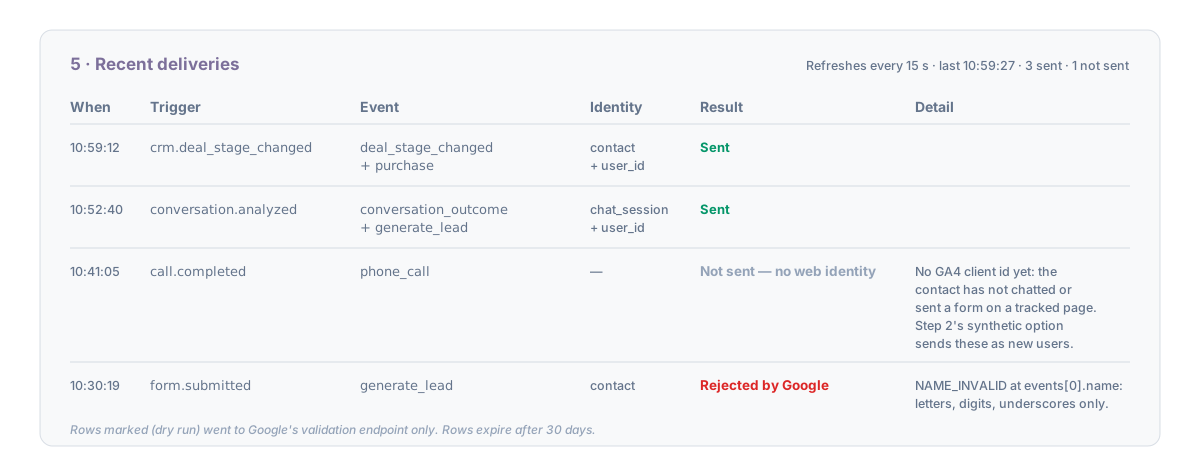
Every send attempt and every deliberate skip is a row: when, the trigger, the GA4 event name(s), the identity used (contact, chat_session, event_meta, synthetic, or none, plus + user_id), the result, and a Detail sentence. The table refreshes every 15 seconds while the page is open and shows the last time it read. Rows expire after 30 days.
Above the table, Last 7 days sums the log: how many contact events there were, how many were sent, how many were not sent, no web identity and what share that is, and how many failed. That share is your tracker health. When at least ten events were logged and half or more had no web identity, the line says so and names the two fixes: put the KarmaFlow tracker or chat widget on the pages visitors land on, or, if these contacts do not come through your site at all, turn on the synthetic option in section 2. Test sends are not counted.
| Result | Meaning |
|---|---|
| Sent | Google accepted the request (or, in dry run, validated it). |
| Not sent, no web identity | The contact has no GA client id yet. The Detail sentence names the one setting that changes it. |
| Not sent, do not contact | The contact is marked Do Not Contact and the row needed hashed user data. |
| Rejected by Google | The validation endpoint returned messages; Detail shows them. |
| Could not reach Google | The request failed after retries. |
Troubleshooting
The test says "Request accepted" but nothing appears in Realtime. The Measurement ID or the API secret belongs to a different stream, or the secret was revoked. Google does not report either; re-create the secret in GA4 for the stream whose id you pasted, save both again, and re-test.
A row says "Not sent, no web identity" for someone who did visit the site. The visit happened before the KarmaFlow tracker or widget was on the page, or the visitor never identified themselves there (no chat, no form, no tracked link). The identity is captured at that moment, not from the visit alone. See the workflows article.
The event map has no "Conversation analyzed" row. Reload the page; rows added since you connected are appended (off, marked New) when the page loads.
"Send events to GA4" is greyed out. A test event has not been accepted yet on this connection. Run Send test event in section 1.
Next steps
- Conversation outcomes and custom events from workflows
- Offline conversions to Google Ads
- Installing the tracker for the identity capture on your site