# Offline conversions to Google Ads
GA4 events reach Google Ads through the property link, at the user level. An **offline conversion upload** goes the direct way: Karmaflow.ai tells your Google Ads account that a specific click (its `gclid`) became a booked job or a qualified lead, with a value. Smart Bidding then learns from revenue attributed to the click, and Enhanced Conversions for Leads covers the contacts who arrived without a click id.
Nothing is uploaded automatically. You decide which trigger becomes which conversion action in a workflow, with the **Upload Google Ads Conversion** step.
> **Availability.** Two things must be true before anything is uploaded. Karmaflow.ai must have switched uploads on platform-wide; until then every attempt is recorded as *Not sent, platform switch off*. And your workspace must be approved by a Karmaflow.ai admin for Google Ads and Analytics data sharing, which you request at the top of **Settings → Integrations → Google Analytics 4** (see [Approval by Karmaflow.ai comes first](/help/integrations/google-analytics-setup)); until then attempts are recorded as *Not sent — awaiting Karmaflow approval*. You can prepare everything meanwhile: the conversion actions and the workflows all work.
## What You'll Need
- **A tenant administrator account** for the settings card.
- **Approval by Karmaflow.ai** for Google Ads and Analytics data sharing, requested on the Google Analytics 4 settings page.
- **A linked Google Ads account** on the Google Ads page (card 2, **Request link** → accept the invitation in Google Ads → **Verify**). See [Connect Google Ads](/help/integrations/google-ads-setup).
- **A conversion action of type "Import → Other data sources or CRMs → Track conversions from clicks"** in your Google Ads account (Goals → Conversions → New conversion action → Import). Website or GA4-imported actions cannot take uploads.
- **Captured click ids** on your contacts for click matching, see [how the visitor is recognised](/help/integrations/google-analytics-workflows#how-the-visitor-is-recognised); or **Enhanced conversions for leads** turned on for the action in Google Ads, for matching by hashed email and phone.
## The settings card
**Settings (the gear icon) → Integrations → Google Ads · Local Services → 5 · Offline conversions to Google Ads**
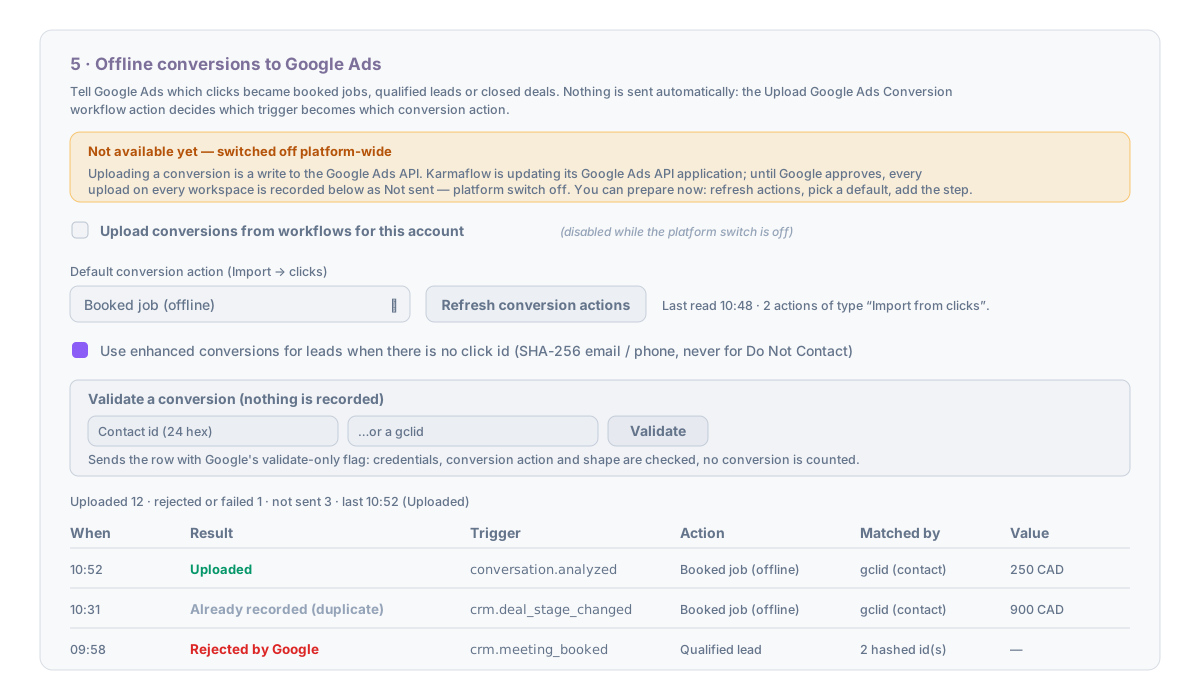
Before an account is linked the card explains how to link one and stops there. Once linked:
1. Press **Refresh conversion actions**. Karmaflow.ai reads the account's conversion actions of the accepting type (one Google operation) and lists them with the time of the read. If none exist, the card says so and where to create one.
2. Optionally choose a **Default conversion action**. A workflow step can still pick its own.
3. Tick **Upload conversions from workflows for this account** when you are ready. While the platform switch is off this box is disabled and the banner explains why.
4. Leave **Use enhanced conversions for leads when there is no click id** on unless your consent basis does not cover it. It sends SHA-256 hashes of the contact's email and phone, never for a contact marked Do Not Contact, and needs *Enhanced conversions for leads* on for the action in Google Ads.
**Validate a conversion (nothing is recorded).** Enter a contact id or a `gclid` and press **Validate**. The request goes to Google with the validate-only flag: credentials, the action and the row shape are checked, no conversion is counted. The result names the match used (`gclid`, or *N hashed identifier(s)*) or shows Google's own rejection text. Disabled while the platform switch is off, because the request itself is a write.
The counters and the **uploads table** at the bottom list every attempt with its result, the trigger, the action, what it matched by, the value, and a Detail sentence in Google's words when Google rejected it.
| Result | Meaning |
|---|---|
| **Uploaded** | Google accepted the conversion. |
| **Validated (test)** | The validate-only test passed. |
| **Already recorded (duplicate order id)** | Google already holds a conversion with this order id for this action; a re-run of the same event, not a failure. |
| **Rejected by Google** | Google refused the row; Detail carries the reason (for example an unparseable click id, or a click older than the action's window). |
| **Not sent, platform switch off** | The platform-wide switch is off. |
| **Not sent — awaiting Karmaflow approval** | Your workspace is not approved for Google data sharing yet. |
| **Not sent, uploads off for this account** | The account switch is off. |
| **Not sent, no conversion action** | The step named an action that is not in the account's list; refresh the list. |
| **Not sent, no click id or hashable contact data** | No click id anywhere on the contact and nothing to hash. |
| **Not sent, Do Not Contact** | No click id, and the contact is opted out so hashed identifiers were withheld. |
## The workflow step
**Agents → Workflows → Orchestrations → your workflow → Add Step → Upload Google Ads Conversion**
1. If the workspace has more than one Google Ads account, choose the **Google Ads account**.
2. Choose the **Conversion action** from the account's list, or type its numeric id if the list has not been refreshed.
3. Optionally map **Value field** and **Currency field or code** from the run (for example `value` and `currency` after a deal stage change).
4. **Order id field** is optional. Empty means *trigger key + event id*: Google counts one conversion per order id per action, so a re-run cannot double-count. Map a field such as `dealId` when you want one conversion per deal instead.
5. **Conversion time field** is optional. Empty means now. The time must be after the click and inside the action's lookback window.
6. **Save**, then **Enable** the workflow.
Under the fields, the same `{{field}}` chips as the GA4 step show what the workflow's trigger carries. The editor also states the current gate: *Uploads are switched off platform-wide for now* or *Uploads are off for this account*, so nobody builds a step that silently does nothing.
How a contact is matched, in order: a click id in the run itself (a chat or form event that carried attribution); the click id stored on the contact; the most recent chat session with a click id; a Google lead-form lead for the contact. With no click id, hashed email and phone are sent as enhanced conversions, unless the contact is Do Not Contact. Consent signals ride on every upload: DENIED for Do Not Contact, GRANTED otherwise.
The step puts `googleAdsUploadStatus` on the run for later branches.
```mermaid
flowchart TD
T["Trigger fires
(e.g. Conversation analyzed, outcomeType = booked)"] --> S["Upload Google Ads Conversion step"]
S --> F{"Platform switch on?
Account switch on?"}
F -- no --> L1["Logged: Not sent + reason"]
F -- yes --> A{"Conversion action known?"}
A -- no --> L2["Logged: Not sent, no conversion action"]
A -- yes --> M{"Click id on run / contact /
chat session / lead form?"}
M -- yes --> U["Upload by gclid / gbraid / wbraid"]
M -- no --> E{"Enhanced conversions on and
contact not Do Not Contact?"}
E -- yes --> H["Upload by hashed email / phone"]
E -- no --> L3["Logged: Not sent + reason"]
U --> R["Google answers per row:
Uploaded · Already recorded · Rejected (with reason)"]
H --> R
```
## Troubleshooting
**Every row says "Not sent, platform switch off".** Karmaflow.ai has not switched uploads on yet; nothing on your side is wrong. Prepare the card and the workflows; they start working when the switch is on.
**Every row says "Not sent — awaiting Karmaflow approval".** Request approval at the top of the Google Analytics 4 settings page, or check its status there.
**"Rejected by Google" with an unparseable click id.** The stored `gclid` was truncated or altered on the way to the contact, usually by a form that rewrote the hidden field. Check the form endpoint's submission; the contact's stored click id is what was received.
**"Rejected by Google" saying the conversion is outside the window.** The click is older than the conversion action's click-through lookback window in Google Ads, or the conversion time you mapped is before the click. Widen the window on the action or leave the time field empty.
**The action list is empty after Refresh.** The account has no conversion action of the accepting type. Create one in Google Ads under Goals → Conversions → New conversion action → Import → Other data sources or CRMs → Track conversions from clicks, then refresh.
## Next steps
- [Conversation outcomes and custom GA4 events from workflows](/help/integrations/google-analytics-workflows)
- [The Google Ads Lifecycle page](/help/integrations/google-ads-lifecycle): spend through to booked and paid work