Agent Handoff
Let an agent fully transfer a chat to another agent, with rules for who and when.
Agent Handoff
Agent handoff lets one chat agent fully transfer a live conversation to another agent. The new agent takes ownership of the session and continues the conversation in place — the visitor stays in the same chat. Because every agent has its own handoff settings, a session can move between agents as many times as needed (for example: Triage → Support → Billing).
This is different from the Operator Panel takeover, which hands a chat to a human. Handoff transfers a chat to another AI agent.
Configuring Handoff
Open a chat agent, go to the Tools tab, and expand Agent Handoff.
- Turn on Allow this agent to hand off chats to other agents.
- Click Add Handoff Target and choose another chat agent.
- In circumstances, describe when this agent should hand off to that target — for example, "The customer wants to discuss billing or refunds."
- Add as many targets as you need, then save.
The circumstances text is how the agent decides which target to pick, so be specific. You only list the agents this agent is allowed to hand off to; each target agent has its own handoff settings that govern where it can send the conversation next.
What the Visitor Sees
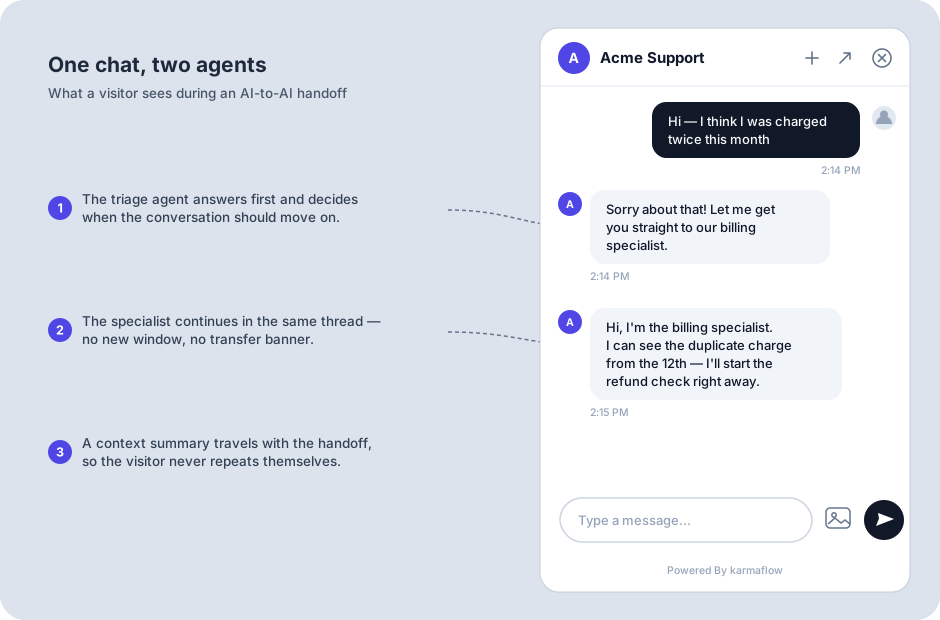
Nothing that looks like a transfer. The widget shows no banner, no "please hold", and no new window — the next reply simply comes from the new agent, in its own voice, usually introducing itself ("Hi, I'm the billing specialist…"). The widget keeps the look of the agent it was embedded with, so the conversation feels like one continuous chat with one assistant that just got more specific.
Context Carries Over
When the AI decides to hand off, it writes a context summary for the target agent: who the visitor is (as far as it knows), what they need, and any details already gathered. The target agent starts from that summary plus the full conversation history — so the visitor is not asked to repeat what they already said, and the specialist can open with something concrete instead of "how can I help?".
Mixing AI Models Across Agents
Each agent keeps its own AI Model setting (on the agent's Setup tab), and a handoff chain can mix them freely. A common pattern is a fast, inexpensive model on the front-door triage agent — for example Gemini 3.8 Flash (Google) — handing off to a specialist that runs a reasoning model such as GPT-6 Luna (Fast Reasoning) for harder, tool-heavy work. The conversation history and the handoff context transfer across models automatically; you don't have to keep a chain on one model or one provider.
How a Handoff Happens
When an agent has handoff targets configured, it can decide — based on the circumstances you described — to transfer the conversation. When it does:
- The session is reassigned to the target agent, which handles all following messages.
- A system note recording the transfer is added to the session transcript, so the change is visible when you review the chat.
- The handoff is recorded in the session's handoff history, shown as an Agent handoffs timeline on the session detail page.
The agent can only hand off to a target you configured. If you remove a target agent, it is automatically dropped from the list.
Operator-Initiated Handoff
A human operator can also move a session to a different agent from the Operator Panel. Operators are not restricted to the configured targets — they can transfer a session to any agent when they need to.
Handoff History
Every transfer is logged. When you review a chat session you can see which agents owned the conversation over time, who triggered each handoff (the AI, an operator, or the system), and why.